<?xml version="1.0" encoding="utf-8"?><feed xmlns="http://www.w3.org/2005/Atom" ><generator uri="https://jekyllrb.com/" version="3.10.0">Jekyll</generator><link href="https://shikaan.github.io/feed.xml" rel="self" type="application/atom+xml" /><link href="https://shikaan.github.io/" rel="alternate" type="text/html" /><updated>2025-04-03T10:36:52+00:00</updated><id>https://shikaan.github.io/feed.xml</id><title type="html">shikaan</title><subtitle>Manuel Spagnolo&apos;s personal blog.</subtitle><author><name>Manuel Spagnolo</name></author><entry><title type="html">A friendly introduction to assembly for high-level programmers — Functions &amp;amp; Loops</title><link href="https://shikaan.github.io/assembly/x86/guide/2024/09/26/x86-64-functions.html" rel="alternate" type="text/html" title="A friendly introduction to assembly for high-level programmers — Functions &amp;amp; Loops" /><published>2024-09-26T00:00:00+00:00</published><updated>2024-09-26T00:00:00+00:00</updated><id>https://shikaan.github.io/assembly/x86/guide/2024/09/26/x86-64-functions</id><content type="html" xml:base="https://shikaan.github.io/assembly/x86/guide/2024/09/26/x86-64-functions.html"><![CDATA[<p><a href="/assembly/x86/guide/2024/09/16/x86-64-conditionals.html">In the previous article</a> we learned about Control Transfer Instructions, and we have seen how they are the cornerstone of control flow in assembly. We looked at their simplest, jump, and learned how to implement conditionals.</p>

<p>Today we will look at reproducing functions. Starting with no arguments, <code class="language-plaintext highlighter-rouge">void</code> functions, all the way up to functions returning multiple values.</p>

<div class="series">
  <h4>A friendly introduction to assembly for high-level programmers</h4>
  <ol>
    
      <li>
        <a href="/assembly/x86/guide/2024/09/08/x86-64-introduction-hello.html">  Hello</a>
      </li>
    
      <li>
        <a href="/assembly/x86/guide/2024/09/16/x86-64-conditionals.html">  Conditionals</a>
      </li>
    
      <li>
        <a href="/assembly/x86/guide/2024/09/26/x86-64-functions.html">  Functions &amp; Loops</a>
      </li>
    
  </ol>
</div>

<h2 id="nullary-void-functions">Nullary Void Functions</h2>

<p>The definition of function<sup id="fnref:1" role="doc-noteref"><a href="#fn:1" class="footnote" rel="footnote">1</a></sup> we will be using in this article is:</p>

<blockquote>
  <p>A named group of instructions that is reusable, can take inputs and can return outputs</p>
</blockquote>

<p>From what we have seen in the previous article, <em>jumps</em> seem like a good approximation of this concept: they provide a mechanism to execute code from elsewhere, and they have a human-readable name. What could one desire more?</p>

<p>In high-level languages, functions do their job and hand back control to the caller once done, typically with the <code class="language-plaintext highlighter-rouge">return</code> keyword. Jumps, conversely, are <em>one-way control transfer</em>: once you jump to a location there is no way back unless the callee knows where to jump to.</p>

<p>The premise that we need to control callee and caller hinders <em>reusability</em>, one property we expect from functions. Imagine authoring a library; functions would have to know details about calling code’s structure to jump back, making it impossible to write modular or reusable code.</p>

<p>How do we make this execution model <em>caller-independent</em>?</p>

<h3 id="call-and-return">Call and return</h3>

<p>At any moment, we know the address of the current instruction because it’s stored in <code class="language-plaintext highlighter-rouge">rip</code>, the instruction pointer. The caller can save this address before jumping to another location, and the callee can later jump back to the next instruction using that saved address. Problem solved, right?</p>

<p>Not quite. Doing all this manually would be tedious and prone to mistakes. Luckily, assembly provides two instructions, <code class="language-plaintext highlighter-rouge">call</code> (call) and <code class="language-plaintext highlighter-rouge">ret</code> (return), to do the math for us. Let’s look at them.</p>

<p>The first, <code class="language-plaintext highlighter-rouge">call</code> looks like a jump:</p>
<div class="language-nasm highlighter-rouge"><div class="highlight"><pre class="highlight"><code><span class="nf">call</span> <span class="nv">label</span>
</code></pre></div></div>
<p>It jumps to the specified label, but before doing so, it saves the current address (the return location) to a special memory region called <em>the stack</em>.</p>

<blockquote>
  <p><strong>Note</strong></p>

  <p>We will look into the details of the stack in the next article. For now, all you need to know is that it’s a memory location where you can store values and retrieve them later.</p>
</blockquote>

<p>Much like in high-level languages, at the end of a function we <em>return</em> to hand the control back to the caller. In assembly, we do that using the <code class="language-plaintext highlighter-rouge">ret</code> (return) instruction</p>
<div class="language-nasm highlighter-rouge"><div class="highlight"><pre class="highlight"><code><span class="nl">label:</span>
 <span class="c1">; code of the function</span>
 <span class="nf">ret</span>
</code></pre></div></div>
<p>Just like a <a href="https://www.youtube.com/watch?v=L0ozIHomn8Q&amp;t=174s">Scooby Doo mask off moment</a>, what we see is once again a jump: <code class="language-plaintext highlighter-rouge">ret</code> fetches the value stored on <em>the stack</em> by <code class="language-plaintext highlighter-rouge">call</code> and jumps back there, giving back control without having to know anything about the caller. Victory!</p>

<p>Let’s look at an example.</p>

<p>We’ll create a little <a href="https://en.wikipedia.org/wiki/Dungeon_crawl">dungeon crawler</a> game where our explorer navigates a maze to find a treasure. We will learn a few new instructions and extensively use functions to reduce boilerplate. Incidentally, we will realize we already know how to implement loops in assembly, our second high-level programming concept for this article.</p>

<code-editor exercise="03-nullary-functions.asm"></code-editor>

<h2 id="arity-and-return-values">Arity and Return Values</h2>

<p>Alright, that was a lot to take in! But the good news is we’ve already covered most of the heavy lifting for today. Great job!</p>

<p>As you know, there is very little one can do with functions without <em>passing parameters</em> or <em>returning values</em>. Let’s go ahead and fix that.</p>

<p>In the examples above, we got comfortable with passing data between functions using <strong>registers</strong>.</p>

<p>For example, before calling <code class="language-plaintext highlighter-rouge">print</code>, we set the values of <code class="language-plaintext highlighter-rouge">rsi</code> and <code class="language-plaintext highlighter-rouge">rdx</code> so that the function had the right data in the correct registers. That’s how parameters are typically<sup id="fnref:2" role="doc-noteref"><a href="#fn:2" class="footnote" rel="footnote">2</a></sup> passed to functions in assembly.</p>

<p>Returning values works the same, but in reverse: when a function needs to return a result, it places the value in a designated register, allowing the caller to retrieve it from there.</p>

<p>This system feels a bit brittle, doesn’t it? How can we make sure that functions don’t overwrite registers we’re relying on? How do we decide which registers to use for what? And how do we preserve values across function calls?</p>

<h3 id="calling-conventions">Calling Conventions</h3>

<p>Since the language can’t inherently enforce rules, assembly relies on <em>calling conventions</em>: guidelines for passing parameters, returning results, and safely using registers to ensure data integrity.</p>

<p>These conventions are part of the Application Binary Interface (ABI), specific to each operating system<sup id="fnref:3" role="doc-noteref"><a href="#fn:3" class="footnote" rel="footnote">3</a></sup>. Our ABI of reference will be <a href="https://gitlab.com/x86-psABIs/x86-64-ABI/-/jobs/artifacts/master/raw/x86-64-ABI/abi.pdf?job=build">x86-64 System V ABI</a>, commonly used in most Unix-like systems.</p>

<p>To prevent unintended data overwriting, the ABI introduces two register categories: <strong>callee-saved</strong> and <strong>caller-saved</strong>.</p>

<ul>
  <li>
    <p><em>callee-saved</em> means the callee is responsible for preserving the value in the register. Practically, it means the callee must either not use the register, or save its original value before use and restore it before returning control to the caller.</p>
  </li>
  <li>
    <p><em>caller-saved</em> means the caller is responsible for preserving the value in the register. In other words, the caller needs to store the register in the stack before invoking a function, if it cares about it.</p>
  </li>
</ul>

<p>Here’s the condensed version of the calling convention we will use in this course.</p>

<table>
  <thead>
    <tr>
      <th style="text-align: left">Register</th>
      <th style="text-align: left">Usage</th>
      <th style="text-align: left">Saved by?</th>
    </tr>
  </thead>
  <tbody>
    <tr>
      <td style="text-align: left">rax</td>
      <td style="text-align: left">1st return register</td>
      <td style="text-align: left">Caller</td>
    </tr>
    <tr>
      <td style="text-align: left">rdi</td>
      <td style="text-align: left">1st function argument</td>
      <td style="text-align: left">Caller</td>
    </tr>
    <tr>
      <td style="text-align: left">rsi</td>
      <td style="text-align: left">2nd function argument</td>
      <td style="text-align: left">Caller</td>
    </tr>
    <tr>
      <td style="text-align: left">rdx</td>
      <td style="text-align: left">3rd function argument, 2nd return register</td>
      <td style="text-align: left">Caller</td>
    </tr>
    <tr>
      <td style="text-align: left">rcx</td>
      <td style="text-align: left">4th function argument</td>
      <td style="text-align: left">Caller</td>
    </tr>
    <tr>
      <td style="text-align: left">r10-r11</td>
      <td style="text-align: left">for temporary data</td>
      <td style="text-align: left">Caller</td>
    </tr>
    <tr>
      <td style="text-align: left">r12-r15</td>
      <td style="text-align: left">for temporary data</td>
      <td style="text-align: left">Callee</td>
    </tr>
  </tbody>
</table>

<p>Sticking with the game theme, we will code a die roller. We won’t introduce new instructions, but we will see calling conventions and we will quickly touch on <em>addressing</em>: a new way of referencing memory that we will explore more in depth later on.</p>

<code-editor exercise="03-functions.asm"></code-editor>

<h2 id="conclusion">Conclusion</h2>

<p>We explored how functions work using <code class="language-plaintext highlighter-rouge">call</code> and <code class="language-plaintext highlighter-rouge">ret</code>, and learned about calling conventions to safely pass parameters, return values, and manage registers without breaking things.</p>

<p>Next up, we’ll dive into the stack; a new tool for handling data beyond registers and fundamental to implement our next high-level construct: <em>scope</em>.</p>

<div class="wrapper">
  <div class="post-footer">
    <div class="link-wrapper">
      <a href="https://news.ycombinator.com/item?id=41702288">Continue on Hackernews</a>
    </div>
  </div>
</div>

<hr />

<template id="code-editor">
  <style>
    .input-wrapper {
      display: flex;
      flex-direction: column;

      header {
        display: flex;
        justify-content: space-between;
        align-items: center;
        margin-bottom: 15px;

        label {
          font-family: monospace;
          height: 30px;
          padding-left: 15px;
          white-space: nowrap;
          overflow: hidden; 
          text-overflow: ellipsis;
          width: calc(100% - 90px - 30px); 
        }
      }

      pre {
        font-family: monospace;
        border-width: 0;
        min-height: 300px;
        margin: 0;
      }

      button {
        appearance: unset;
        background: #111;
        padding: 10px 30px;
        border: 0;
        color: #fdfdfd;
        font-size: 16px;
        font-family: system-ui, sans-serif;
        font-weight: bold;
        cursor: pointer;
        width: 90px;

        &:active {
          background: #222;
        }
      }
    }

    .output {
      display: block;
      height: 90px;
      overflow: auto;
      background-color: #e8e8e8;
      padding: 15px;
      font-style: italic;
      margin: 0 0 15px 0;
    }
  </style>
  <iframe hidden="" src="https://onecompiler.com/embed/assembly/?listenToEvents=true&amp;codeChangeEvent=true"></iframe>
  <div class="input-wrapper">
    <header>
      <label id="label" for="input"></label>
      <button class="run">Run</button>
    </header>
    <textarea id="input" class="input">
      Loading...
    </textarea>
  </div>
  <pre id="output" class="output">Loading...</pre>
</template>

<script type="module">
  import 'https://cdnjs.cloudflare.com/ajax/libs/ace/1.36.2/ace.min.js';
  import 'https://cdnjs.cloudflare.com/ajax/libs/ace/1.36.2/mode-assembly_x86.min.js';
  ace.config.set('basePath', 'https://cdnjs.cloudflare.com/ajax/libs/ace/1.36.2');

  customElements.define('code-editor', class extends HTMLElement {
    constructor() {
      super();
      this.attachShadow({ mode: 'open' });
      this.shadowRoot.appendChild(document.getElementById('code-editor').content.cloneNode(true));
    }

    connectedCallback() {
      const $frame = this.shadowRoot.querySelector('iframe');
      const $run = this.shadowRoot.querySelector('.run');
      const $output = this.shadowRoot.querySelector('.output');
      const $input = this.shadowRoot.querySelector('.input');
      const $label = this.shadowRoot.querySelector('#label');

      const exercise = this.attributes.exercise.value;
      const editor = ace.edit($input, {
        mode: "ace/mode/assembly_x86",
        fontSize: "16px",
        theme: "ace/theme/github_light_default",
      });
      editor.renderer.setShowGutter(false);
      editor.renderer.attachToShadowRoot();
      $label.innerHTML = exercise;

      $frame.onload = () => {
        fetch(`https://raw.githubusercontent.com/shikaan/x86-64-asm-intro/main/${exercise}`)
          .then(response => response.text())
          .then(data => {
            $output.innerHTML = 'Output will appear here';
            const code = editor.setValue(data, -1);
            $frame.contentWindow.postMessage({
              eventType: 'populateCode',
              language: 'assembly',
              files: [
                {
                  "name": exercise,
                  "content": code
                }
              ]
            }, "*");
  
            editor.on('change', (e) => {
              $frame.contentWindow.postMessage({
                eventType: 'populateCode',
                language: 'assembly',
                files: [
                  {
                    "name": exercise,
                    "content": editor.getValue()
                  }
                ]
              }, "*");
            })
  
            $run.addEventListener('click', () => {
              $frame.contentWindow.postMessage({
                eventType: 'triggerRun'
              }, "*");
            });
  
            window.addEventListener('message', (e) => {
              if (!e.data) return;
              // iframe is posting on the parent window, so we need to check if the message
              // is coming from this element
              if (e.data.files[0].name !== exercise) return;
  
              switch (e.data.action) {
                case 'runComplete':
                  $input.disabled = false;
                  $run.disabled = false;
                  $output.innerHTML = e.data.result.stdout ?? e.data.result.output;
                  break;
                case 'runStart':
                  $input.disabled = true;
                  $run.disabled = true;
                  $output.innerHTML = 'Running...';
                  break;
                default:
                  break;
              }
            }, { capture: true });
          });
      }
    }
  });
</script>

<div class="footnotes" role="doc-endnotes">
  <ol>
    <li id="fn:1" role="doc-endnote">
      <p>Finding an agreed-upon definition of function is not that easy, hence why I came up with a new one. Imagine how different functions are between functional programming, lambda calculus, and mathematics, for example. Speaking of wide definitions, here’s a fun personal anecdote: during my studies, I had two <em>harmonic functions</em> classes in the same semester, one in math school and the other in jazz school. <a href="#fnref:1" class="reversefootnote" role="doc-backlink">&#8617;</a></p>
    </li>
    <li id="fn:2" role="doc-endnote">
      <p>You might wonder what happens when you have more arguments than registers or when data is larger than a register’s size. In the next lesson, we will learn more about the stack and answer all these questions. <a href="#fnref:2" class="reversefootnote" role="doc-backlink">&#8617;</a></p>
    </li>
    <li id="fn:3" role="doc-endnote">
      <p>More precisely, the ABI specifies how different binaries (such as a program and the operative system) interact at the binary level. Besides calling conventions, it specifies how binaries are formatted, how data is laid out in memory, and the system call interface. You can imagine it as a low-level equivalent of an API (Application Programming Interface) for more programs. <a href="#fnref:3" class="reversefootnote" role="doc-backlink">&#8617;</a></p>
    </li>
  </ol>
</div>]]></content><author><name>Manuel Spagnolo</name></author><category term="assembly" /><category term="x86" /><category term="guide" /><summary type="html"><![CDATA[A friendly introduction to assembly for high-level programmers — Functions & Loops]]></summary></entry><entry><title type="html">A friendly introduction to assembly for high-level programmers — Conditionals</title><link href="https://shikaan.github.io/assembly/x86/guide/2024/09/16/x86-64-conditionals.html" rel="alternate" type="text/html" title="A friendly introduction to assembly for high-level programmers — Conditionals" /><published>2024-09-16T00:00:00+00:00</published><updated>2024-09-16T00:00:00+00:00</updated><id>https://shikaan.github.io/assembly/x86/guide/2024/09/16/x86-64-conditionals</id><content type="html" xml:base="https://shikaan.github.io/assembly/x86/guide/2024/09/16/x86-64-conditionals.html"><![CDATA[<p><a href="/assembly/x86/guide/2024/09/08/x86-64-introduction-hello.html">In the previous article</a>, we learned about the basics of the assembly’s syntax and managed to create a program with just two instructions. Quite impressive!</p>

<p>We will spend this lesson learning more instructions and use this knowledge to translate the first high-level construct into assembly: conditionals.</p>

<div class="series">
  <h4>A friendly introduction to assembly for high-level programmers</h4>
  <ol>
    
      <li>
        <a href="/assembly/x86/guide/2024/09/08/x86-64-introduction-hello.html">  Hello</a>
      </li>
    
      <li>
        <a href="/assembly/x86/guide/2024/09/16/x86-64-conditionals.html">  Conditionals</a>
      </li>
    
      <li>
        <a href="/assembly/x86/guide/2024/09/26/x86-64-functions.html">  Functions &amp; Loops</a>
      </li>
    
  </ol>
</div>

<h2 id="control-transfer-instructions">Control Transfer Instructions</h2>

<p>Remember those old movies where computers were fed with long tapes of instructions? Surprisingly, today’s lightning-fast CPUs still work similarly, but executing instructions coming from a sequence of bytes in memory. We call this sequence the <em>instruction stream</em>, and the unique position of each instruction an <em>address</em>. As we saw in the previous article, the address of the instruction currently being executed is stored in the <code class="language-plaintext highlighter-rouge">rip</code> register, which is why we call it the <em>instruction pointer</em>.</p>

<p>Imagining the instruction stream as an array whose indices are the addresses<sup id="fnref:1" role="doc-noteref"><a href="#fn:1" class="footnote" rel="footnote">1</a></sup>, the execution of a program in pseudo-code would read something like this:</p>
<div class="language-plaintext highlighter-rouge"><div class="highlight"><pre class="highlight"><code>while not exited
  // Fetch the instruction at `registers.rip`
  instruction = instruction_stream[registers.rip]
  // Execute the instruction and return the
  // address of the next instruction.
  next_pointer = instruction.execute()
  // Assign the new address to `rip` to fetch
  // a new instruction on the next iteration.
  registers.rip = next_pointer
  // Handle side effects (we won't look into this)
</code></pre></div></div>

<p>Most of the time, the execution is linear: instructions are executed one after the other, in the order they are coded. Some instructions, however, can break this convention and are called <em>Control Transfer Instructions</em> (CTIs).</p>

<p>CTIs come in three flavors: <em>conditional</em>, <em>unconditional</em>, and <em>software interrupts</em>. We’ll focus on the first two, as they are the foundation of control flow in assembly, allowing the execution of non-consecutive instructions. Software interrupts, while interesting, are closely intertwined with operating systems and beyond the scope of this series<sup id="fnref:2" role="doc-noteref"><a href="#fn:2" class="footnote" rel="footnote">2</a></sup>.</p>

<p>The first CTI we will explore is <code class="language-plaintext highlighter-rouge">jmp</code> (jump).</p>

<h3 id="unconditional-jumps">Unconditional jumps</h3>

<p>Jumps allow executing code at an arbitrary position in the instruction stream. All they need to do is update the <code class="language-plaintext highlighter-rouge">rip</code> and, on the next cycle, the CPU will pick up the instruction at the new address.</p>

<p>Syntactically, a jump looks like this</p>
<div class="language-nasm highlighter-rouge"><div class="highlight"><pre class="highlight"><code><span class="nf">jmp</span> <span class="nv">label</span>
</code></pre></div></div>
<p>where the operand represents the destination instruction.</p>

<p>Almost always, the destination is a label, and in plain English, the instruction above reads: “Continue the execution from the instruction whose label is <code class="language-plaintext highlighter-rouge">label</code>.”</p>

<p>The assembler, the software that turns assembly into machine code, translates the labels into a numeric address of the instruction stream and, on execution, it will be assigned to <code class="language-plaintext highlighter-rouge">rip</code> as described above.</p>

<p>In fact, numeric addresses and relative offsets to <code class="language-plaintext highlighter-rouge">rip</code> are all valid destinations, but they are usually more in vogue among machines than humans. For example, compilers with optimization flags or disassemblers prefer using numeric addressing rather than labels.</p>

<p>The attentive readers will have noticed that the jump we just described does not depend on any condition: if the program reaches that line, it’ll jump. This makes this instruction <em>unconditional</em>.</p>

<p>Let’s see an example in action.</p>

<p>We will use <a href="/assembly/x86/guide/2024/09/08/x86-64-introduction-hello.html">the same hello world example from the first lesson</a>. We will make it more human-readable by introducing jumps to break the code into smaller chunks. En passant, we will introduce numeric constants to remove magic numbers from our code.</p>

<code-editor exercise="02-hello-with-jumps.asm"></code-editor>

<h3 id="conditional-jumps">Conditional Jumps</h3>

<p>As you might have guessed, we will implement conditional control flow using <em>conditional</em> CTIs and in particular <em>conditional jumps</em>. Don’t worry – we’ve already laid the groundwork with jumps, and conditional jumps are just an extension of the same concept.</p>

<p>Coming from high-level languages, you might be used to versatile conditional statements like <code class="language-plaintext highlighter-rouge">if</code>, <code class="language-plaintext highlighter-rouge">unless</code>, or <code class="language-plaintext highlighter-rouge">when</code>. Assembly takes a different approach. Instead of a few all-purpose conditionals, it provides a large number of specialized instructions for specific checks.</p>

<p>Fortunately, these instructions follow logical naming conventions that make them easier to remember. Let’s check an example out.</p>

<div class="language-nasm highlighter-rouge"><div class="highlight"><pre class="highlight"><code><span class="nf">jne</span> <span class="nv">label</span>
</code></pre></div></div>
<p>Here, <code class="language-plaintext highlighter-rouge">label</code> refers to an instruction in our code, just like we saw with unconditional jumps. In plain English, this would read “<strong>J</strong>ump to <code class="language-plaintext highlighter-rouge">label</code>, if <strong>N</strong>ot <strong>E</strong>qual.”</p>

<p>The following table provides mappings to navigate the most common conditional jumps<sup id="fnref:3" role="doc-noteref"><a href="#fn:3" class="footnote" rel="footnote">3</a></sup>:</p>

<table>
  <thead>
    <tr>
      <th style="text-align: left">Letter</th>
      <th style="text-align: left">Meaning</th>
    </tr>
  </thead>
  <tbody>
    <tr>
      <td style="text-align: left"><code class="language-plaintext highlighter-rouge">j</code> (prefix)</td>
      <td style="text-align: left">jump</td>
    </tr>
    <tr>
      <td style="text-align: left"><code class="language-plaintext highlighter-rouge">n</code></td>
      <td style="text-align: left">not</td>
    </tr>
    <tr>
      <td style="text-align: left"><code class="language-plaintext highlighter-rouge">z</code></td>
      <td style="text-align: left">zero</td>
    </tr>
    <tr>
      <td style="text-align: left"><code class="language-plaintext highlighter-rouge">e</code></td>
      <td style="text-align: left">equals</td>
    </tr>
    <tr>
      <td style="text-align: left"><code class="language-plaintext highlighter-rouge">g</code></td>
      <td style="text-align: left">greater than</td>
    </tr>
    <tr>
      <td style="text-align: left"><code class="language-plaintext highlighter-rouge">l</code></td>
      <td style="text-align: left">less than</td>
    </tr>
  </tbody>
</table>

<p>Here’s a few more examples:</p>
<ul>
  <li><code class="language-plaintext highlighter-rouge">je label</code>: “jump if equal”</li>
  <li><code class="language-plaintext highlighter-rouge">jnz label</code>: “jump if not zero”</li>
  <li><code class="language-plaintext highlighter-rouge">jg label</code>: “jump if greater than”</li>
</ul>

<p>These instructions do exactly what their names suggest: if the condition is met, the program jumps to the destination label. If not, it simply continues to the next line. Just like with unconditional jumps, the destinations can also be specified numerically.</p>

<p>Now, you might be wondering: “Equal to what?” “Greater than what?” “Zero compared to what?”</p>

<p>Let us answer these questions diving into the mechanics behind comparisons in assembly, introducing a special register that plays a crucial role in this process: the <code class="language-plaintext highlighter-rouge">eflags</code> register.</p>

<h2 id="flags">Flags</h2>

<p>The <code class="language-plaintext highlighter-rouge">eflags</code> is a 32-bit register<sup id="fnref:4" role="doc-noteref"><a href="#fn:4" class="footnote" rel="footnote">4</a></sup> that stores various flags. Unlike general-purpose registers, <code class="language-plaintext highlighter-rouge">eflags</code> is read bit by bit, with each position representing a specific flag. You can think of these flags as a set of boolean values built right into the CPU. When a bit is 1, the corresponding flag is <code class="language-plaintext highlighter-rouge">true</code>, and when it’s 0, the flag is <code class="language-plaintext highlighter-rouge">false</code>.</p>

<figure>
  <img src="https://github.com/user-attachments/assets/5fde252c-7af9-4591-91db-d9b238fd712e" alt="EFLAGS layout" />
  
</figure>

<p>Flags serve multiple purposes<sup id="fnref:5" role="doc-noteref"><a href="#fn:5" class="footnote" rel="footnote">5</a></sup>, but for our discussion, they’re used to provide context after an operation. For instance, if an addition results in zero, the <em>overflow flag</em> (OF) can tell us whether this is due to an actual zero result or an overflow. They are relevant to us, since flags are how assembly stores the results of comparisons.</p>

<p>In this section we will only look at the following flags:</p>
<ul>
  <li>the <em>zero flag</em> (ZF), set to 1 when an operation results in zero;</li>
  <li>the <em>sign flag</em> (SF), set to 1 when the result of an operation is negative.</li>
</ul>

<p>The <code class="language-plaintext highlighter-rouge">cmp</code> (compare) instruction is one common way of performing comparisons:</p>
<div class="language-nasm highlighter-rouge"><div class="highlight"><pre class="highlight"><code><span class="nf">cmp</span> <span class="nb">rax</span><span class="p">,</span> <span class="nb">rbx</span>
</code></pre></div></div>
<p>This instruction subtracts the second operand from the first without storing the result. Instead, it sets flags based on the comparison. For example:</p>
<ul>
  <li>If the operands are equal, the zero flag (ZF) is set to 1;</li>
  <li>If the first operand is greater than the second, the sign flag (SF) is set to 0.</li>
</ul>

<p>With this understanding, the meaning of conditional jumps should become clear:</p>
<ul>
  <li>“jump if equal” (<code class="language-plaintext highlighter-rouge">je</code>) translates to “jump if ZF=1”</li>
  <li>“jump if not zero” (<code class="language-plaintext highlighter-rouge">jnz</code>) translates to “jump if ZF=0” (equivalent to <code class="language-plaintext highlighter-rouge">jne</code>)</li>
  <li>“jump if greater than” (<code class="language-plaintext highlighter-rouge">jg</code>) means “jump if SF=0 or ZF=0”<sup id="fnref:6" role="doc-noteref"><a href="#fn:6" class="footnote" rel="footnote">6</a></sup></li>
</ul>

<h2 id="at-last-conditionals">At last, conditionals</h2>

<p>We are now, finally, ready to write conditionals in assembly. Joy!</p>

<p>Consider this simple pseudo-code:</p>
<div class="language-plaintext highlighter-rouge"><div class="highlight"><pre class="highlight"><code>if rax == rbx 
  success()
else
  error()
</code></pre></div></div>

<p>In assembly, we can express this logic as follows:</p>
<div class="language-nasm highlighter-rouge"><div class="highlight"><pre class="highlight"><code><span class="c1">; Compare values in rax and rbx</span>
<span class="nf">cmp</span> <span class="nb">rax</span> <span class="nb">rbx</span>
<span class="c1">; If they are the equal, jump to `success`</span>
<span class="nf">je</span> <span class="nv">success</span>
<span class="c1">; Else, jump to `error`</span>
<span class="nf">jmp</span> <span class="nv">error</span>
</code></pre></div></div>

<p>This assembly code first compares the values in the rax and rbx registers using the cmp instruction. Then, it uses conditional and unconditional jumps (<code class="language-plaintext highlighter-rouge">je</code> and <code class="language-plaintext highlighter-rouge">jmp</code>) to control the program flow based on the comparison result.</p>

<p>Let’s look at another example. Enough hello world. This time around we build a serious software that performs an addition and checks if the result is what we expect. Very serious.</p>

<code-editor exercise="02-sum.asm"></code-editor>

<h2 id="conclusion">Conclusion</h2>

<p>We made it, friends! We’ve explored the fundamental building blocks of control flow in assembly language.</p>

<p>We’ve learned about Control Transfer Instructions (CTIs), focusing on unconditional and conditional jumps. We’ve seen how the instruction pointer (<code class="language-plaintext highlighter-rouge">rip</code>) guides program execution and how jumps manipulate this flow. We’ve delved into the <code class="language-plaintext highlighter-rouge">eflags</code> register and its crucial role in comparisons, understanding how flags like the zero flag (ZF) and sign flag (SF) inform conditional operations. Finally, combining the <code class="language-plaintext highlighter-rouge">cmp</code> instruction with jumps, we’ve constructed the assembly equivalent of high-level language conditionals.</p>

<p>While jumps enable basic control flow, they can make code hard to follow. <a href="/assembly/x86/guide/2024/09/26/x86-64-functions.html">In our next article</a>, we’ll introduce the equivalent of functions: a way to execute code from elsewhere while maintaining a linear flow. You’ll see how this approach mirrors procedural code in high-level languages, making assembly more intuitive and organized.</p>

<div class="wrapper">
  <div class="post-footer">
    <div class="link-wrapper">
      <a href="https://news.ycombinator.com/item?id=41663149">Continue on Hackernews</a>
    </div>
  </div>
</div>

<hr />

<template id="code-editor">
  <style>
    .input-wrapper {
      display: flex;
      flex-direction: column;

      header {
        display: flex;
        justify-content: space-between;
        align-items: center;
        margin-bottom: 15px;

        label {
          font-family: monospace;
          height: 30px;
          padding-left: 15px;
          white-space: nowrap;
          overflow: hidden; 
          text-overflow: ellipsis;
          width: calc(100% - 90px - 30px); 
        }
      }

      pre {
        font-family: monospace;
        border-width: 0;
        min-height: 300px;
        margin: 0;
      }

      button {
        appearance: unset;
        background: #111;
        padding: 10px 30px;
        border: 0;
        color: #fdfdfd;
        font-size: 16px;
        font-family: system-ui, sans-serif;
        font-weight: bold;
        cursor: pointer;
        width: 90px;

        &:active {
          background: #222;
        }
      }
    }

    .output {
      display: block;
      height: 90px;
      overflow: auto;
      background-color: #e8e8e8;
      padding: 15px;
      font-style: italic;
      margin: 0 0 15px 0;
    }
  </style>
  <iframe hidden="" src="https://onecompiler.com/embed/assembly/?listenToEvents=true&amp;codeChangeEvent=true"></iframe>
  <div class="input-wrapper">
    <header>
      <label id="label" for="input"></label>
      <button class="run">Run</button>
    </header>
    <textarea id="input" class="input">
      Loading...
    </textarea>
  </div>
  <pre id="output" class="output">Loading...</pre>
</template>

<script type="module">
  import 'https://cdnjs.cloudflare.com/ajax/libs/ace/1.36.2/ace.min.js';
  import 'https://cdnjs.cloudflare.com/ajax/libs/ace/1.36.2/mode-assembly_x86.min.js';
  ace.config.set('basePath', 'https://cdnjs.cloudflare.com/ajax/libs/ace/1.36.2');

  customElements.define('code-editor', class extends HTMLElement {
    constructor() {
      super();
      this.attachShadow({ mode: 'open' });
      this.shadowRoot.appendChild(document.getElementById('code-editor').content.cloneNode(true));
    }

    connectedCallback() {
      const $frame = this.shadowRoot.querySelector('iframe');
      const $run = this.shadowRoot.querySelector('.run');
      const $output = this.shadowRoot.querySelector('.output');
      const $input = this.shadowRoot.querySelector('.input');
      const $label = this.shadowRoot.querySelector('#label');

      const exercise = this.attributes.exercise.value;
      const editor = ace.edit($input, {
        mode: "ace/mode/assembly_x86",
        fontSize: "16px",
        theme: "ace/theme/github_light_default",
      });
      editor.renderer.setShowGutter(false);
      editor.renderer.attachToShadowRoot();
      $label.innerHTML = exercise;

      $frame.onload = () => {
        fetch(`https://raw.githubusercontent.com/shikaan/x86-64-asm-intro/main/${exercise}`)
          .then(response => response.text())
          .then(data => {
            $output.innerHTML = 'Output will appear here';
            const code = editor.setValue(data, -1);
            $frame.contentWindow.postMessage({
              eventType: 'populateCode',
              language: 'assembly',
              files: [
                {
                  "name": exercise,
                  "content": code
                }
              ]
            }, "*");
  
            editor.on('change', (e) => {
              $frame.contentWindow.postMessage({
                eventType: 'populateCode',
                language: 'assembly',
                files: [
                  {
                    "name": exercise,
                    "content": editor.getValue()
                  }
                ]
              }, "*");
            })
  
            $run.addEventListener('click', () => {
              $frame.contentWindow.postMessage({
                eventType: 'triggerRun'
              }, "*");
            });
  
            window.addEventListener('message', (e) => {
              if (!e.data) return;
              // iframe is posting on the parent window, so we need to check if the message
              // is coming from this element
              if (e.data.files[0].name !== exercise) return;
  
              switch (e.data.action) {
                case 'runComplete':
                  $input.disabled = false;
                  $run.disabled = false;
                  $output.innerHTML = e.data.result.stdout ?? e.data.result.output;
                  break;
                case 'runStart':
                  $input.disabled = true;
                  $run.disabled = true;
                  $output.innerHTML = 'Running...';
                  break;
                default:
                  break;
              }
            }, { capture: true });
          });
      }
    }
  });
</script>

<div class="footnotes" role="doc-endnotes">
  <ol>
    <li id="fn:1" role="doc-endnote">
      <p>This mental model is not entirely made up: emulators usually represent instruction streams as arrays, for example. If you are interested in emulation, <a href="https://en.wikipedia.org/wiki/CHIP-8">CHIP-8</a> is a great place to start and <a href="https://austinmorlan.com/posts/chip8_emulator/">this a good guide</a> to get your hands dirty. <a href="#fnref:1" class="reversefootnote" role="doc-backlink">&#8617;</a></p>
    </li>
    <li id="fn:2" role="doc-endnote">
      <p>I say <em>explicitly</em> because, for example, the <code class="language-plaintext highlighter-rouge">syscall</code> instruction may issue an interrupt. The cooperation between operating systems and user programs makes for a fascinating world in its own right and discussing it here would do it no justice. If you are curious, you can consult any operative systems book. Personal recommendation, <a href="https://pages.cs.wisc.edu/~remzi/OSTEP/">OSTEP</a> and in particular <a href="https://pages.cs.wisc.edu/~remzi/OSTEP/cpu-mechanisms.pdf">this chapter</a>. <a href="#fnref:2" class="reversefootnote" role="doc-backlink">&#8617;</a></p>
    </li>
    <li id="fn:3" role="doc-endnote">
      <p>For a complete overview refer to the <a href="https://www.intel.com/content/www/us/en/developer/articles/technical/intel-sdm.html">Intel Software Developer Manuals (SDM)</a>, in the “Jump if Condition is Met” section. <a href="#fnref:3" class="reversefootnote" role="doc-backlink">&#8617;</a></p>
    </li>
    <li id="fn:4" role="doc-endnote">
      <p>The prefix <em>e</em> in <em>eflags</em> stands for <em>extended</em>. It comes from the transition from 16-bit to 32-bit registers, where the latter were considered extensions of the former. <a href="#fnref:4" class="reversefootnote" role="doc-backlink">&#8617;</a></p>
    </li>
    <li id="fn:5" role="doc-endnote">
      <p>Once again, the complete list can be found in the <a href="https://www.intel.com/content/www/us/en/developer/articles/technical/intel-sdm.html">Intel Software Developer Manuals (SDM)</a>. The section to look for is “EFLAGS Register”. <a href="#fnref:5" class="reversefootnote" role="doc-backlink">&#8617;</a></p>
    </li>
    <li id="fn:6" role="doc-endnote">
      <p>For simplicity’s sake, we ignored <code class="language-plaintext highlighter-rouge">cmp</code> overflows. You can account for them by using – you guessed it – the <em>overflow flag</em> (OF). For example, the overflow-adjusted version of <code class="language-plaintext highlighter-rouge">jg</code> is “jump if SF=OF and ZF=0.” Don’t sweat if it’s not clear: it’s not crucial for this introduction, and we will likely touch on that later. <a href="#fnref:6" class="reversefootnote" role="doc-backlink">&#8617;</a></p>
    </li>
  </ol>
</div>]]></content><author><name>Manuel Spagnolo</name></author><category term="assembly" /><category term="x86" /><category term="guide" /><summary type="html"><![CDATA[A friendly introduction to assembly for high-level programmers — Conditionals]]></summary></entry><entry><title type="html">A friendly introduction to assembly for high-level programmers — Hello</title><link href="https://shikaan.github.io/assembly/x86/guide/2024/09/08/x86-64-introduction-hello.html" rel="alternate" type="text/html" title="A friendly introduction to assembly for high-level programmers — Hello" /><published>2024-09-08T00:00:00+00:00</published><updated>2024-09-08T00:00:00+00:00</updated><id>https://shikaan.github.io/assembly/x86/guide/2024/09/08/x86-64-introduction-hello</id><content type="html" xml:base="https://shikaan.github.io/assembly/x86/guide/2024/09/08/x86-64-introduction-hello.html"><![CDATA[<p>Coming from JavaScript, Rust, C, or any other high-level language, looking at assembly snippets can be confusing or even scary.</p>

<p>Let’s take the following snippet:</p>
<div class="language-nasm highlighter-rouge"><div class="highlight"><pre class="highlight"><code><span class="nf">section</span> <span class="nv">.data</span>
  <span class="nf">msg</span> <span class="nv">db</span> <span class="s">"Hello, World!"</span>

<span class="nf">section</span> <span class="nv">.text</span>
  <span class="nf">global</span> <span class="nv">_start</span>

<span class="nl">_start:</span>
  <span class="nf">mov</span> <span class="nb">rax</span><span class="p">,</span> <span class="mi">1</span>
  <span class="nf">mov</span> <span class="nb">rdi</span><span class="p">,</span> <span class="mi">1</span>
  <span class="nf">mov</span> <span class="nb">rsi</span><span class="p">,</span> <span class="nv">msg</span>
  <span class="nf">mov</span> <span class="nb">rdx</span><span class="p">,</span> <span class="mi">13</span>
  <span class="nf">syscall</span>

  <span class="nf">mov</span> <span class="nb">rax</span><span class="p">,</span> <span class="mi">60</span>
  <span class="nf">mov</span> <span class="nb">rdi</span><span class="p">,</span> <span class="mi">0</span>
  <span class="nf">syscall</span>
</code></pre></div></div>
<p>Thankfully the second line gives away what this does.</p>

<p>None of the bread and butter of programming as we know it is here: conditionals and loops are nowhere to be seen, there is no way to create functions… heck, variables don’t even have names!</p>

<p>Where does one even start?</p>

<p>This little introduction is meant to introduce you, somebody with programming experience, to the world of assembly. We’ll discuss the basics of the language and map them to high-level programming constructs.</p>

<p>By the end of this guide, you will be able to navigate assembly code, know where to look for information, and even write some simple programs all by yourself.</p>

<p>Let’s get started!</p>

<div class="series">
  <h4>A friendly introduction to assembly for high-level programmers</h4>
  <ol>
    
      <li>
        <a href="/assembly/x86/guide/2024/09/08/x86-64-introduction-hello.html">  Hello</a>
      </li>
    
      <li>
        <a href="/assembly/x86/guide/2024/09/16/x86-64-conditionals.html">  Conditionals</a>
      </li>
    
      <li>
        <a href="/assembly/x86/guide/2024/09/26/x86-64-functions.html">  Functions &amp; Loops</a>
      </li>
    
  </ol>
</div>

<h2 id="hello-world">Hello world</h2>

<p>Unsurprisingly, our first program will be a “Hello World”.</p>

<p>Before jumping into the code though, we need to briefly introduce the language we’ll be using. At the end of this section, we will be able to write and run our first assembly program.</p>

<h3 id="x86-64-assembly">x86-64 assembly</h3>

<p>First things first, assembly is not a language.</p>

<p>Assembly refers to a <em>family of programming languages</em> featuring instructions that closely map to the machine code that the CPU will execute. In fact, one of the raisons d’etre of assembly languages is to provide a human-readable version of machine code in situations like reverse engineering, hardware programming, or developing games for consoles.</p>

<p>In this guide, we will use <em>x86-64 assembly</em> which can be assembled and executed on most personal computers. This choice should ease running and tinkering with the snippets along the way.</p>

<p>For historical reasons, there are two “flavors” of the x64-64 assembly syntax: one called <em>Intel</em> and the other is called <em>AT&amp;T</em><sup id="fnref:1" role="doc-noteref"><a href="#fn:1" class="footnote" rel="footnote">1</a></sup>.</p>

<p>In this guide we will stick to the <em>Intel</em> dialect because it’s used by the <a href="https://www.intel.com/content/www/us/en/developer/articles/technical/intel-sdm.html">Intel Software Developer Manuals (SDM)</a>, the source of truth on what the CPU <em>really</em> does when fed an instruction.</p>

<p>Assembly is all about working close to the hardware. Optimizimg for portability of the code examples across operative systems and architactures would obfuscate the content of this introduction.</p>

<p>The snippets we will be written for Linux, and they should run fine on Window’s WSL as well. The general concepts and practices are nonetheless valid regardless of your OS of choice.</p>

<h3 id="anatomy-of-an-instruction">Anatomy of an instruction</h3>

<p>Instructions are the way we tell the CPU what to do. They look something like this:</p>

<div class="language-nasm highlighter-rouge"><div class="highlight"><pre class="highlight"><code><span class="nf">mov</span> <span class="nb">rax</span><span class="p">,</span> <span class="nb">rbx</span>
</code></pre></div></div>

<p>They represent the smallest unit of assembly language and are mostly composed of two parts:</p>

<ul>
  <li><strong>mnemonic</strong>: a shortened word or sentence that specifies the operation to be performed</li>
  <li><strong>operands</strong>: a list of 0-3 items representing what’s affected by the operation</li>
</ul>

<p>In our example, the mnemonic is <code class="language-plaintext highlighter-rouge">mov</code>, which stands for <em>move</em>, and the operands are <code class="language-plaintext highlighter-rouge">rax</code> and <code class="language-plaintext highlighter-rouge">rbx</code>. This instruction in plain English would read: move the content of <code class="language-plaintext highlighter-rouge">rbx</code> to <code class="language-plaintext highlighter-rouge">rax</code>.</p>

<blockquote>
  <p><strong>Note</strong></p>

  <p><code class="language-plaintext highlighter-rouge">rax</code> and <code class="language-plaintext highlighter-rouge">rbx</code> are registers and we will introduce them in the next paragraph. In the meantime, you can imagine them as variables holding a value.</p>
</blockquote>

<p>Some instructions will have more then mnemonic and operands. Additional parts such as <em>prefixes</em> and <em>size directives</em> will only be needed later, and we’ll talk through them at the right moment.</p>

<p>Fear not, there is no need to memorize all the possible instructions now. Whenever we’ll come across new operations, we will discuss them, and with repetition you will remember in no time.</p>

<p>The <a href="https://www.intel.com/content/www/us/en/developer/articles/technical/intel-sdm.html">Intel Software Developer Manuals (SDM)</a> will be our instruction reference in the next chapters. Keep it handy!</p>

<h3 id="storing-data-registers">Storing data: Registers</h3>

<p>You can think of registers as storage space baked right into the CPU itself. They are small and incredibly fast to access.</p>

<p>The most common registers are the so-called <em>general purpose</em> registers. In x86-64 they are sixteen in total, and they are 64 bits wide.</p>

<p>One can access the whole register or a subset by using different names. For example, using <code class="language-plaintext highlighter-rouge">rax</code> (as in the code above) would address all the 64 bits in the <code class="language-plaintext highlighter-rouge">rax</code> register. With <code class="language-plaintext highlighter-rouge">al</code>, you can access the lower byte of the same register.</p>

<table>
  <thead>
    <tr>
      <th style="text-align: left">Register</th>
      <th style="text-align: left">Higher byte</th>
      <th style="text-align: left">Lower byte</th>
      <th style="text-align: left">Lower 2 bytes¹</th>
      <th style="text-align: left">Lower 4 bytes²</th>
    </tr>
  </thead>
  <tbody>
    <tr>
      <td style="text-align: left">rax</td>
      <td style="text-align: left">ah</td>
      <td style="text-align: left">al</td>
      <td style="text-align: left">ax</td>
      <td style="text-align: left">eax</td>
    </tr>
    <tr>
      <td style="text-align: left">rcx</td>
      <td style="text-align: left">ch</td>
      <td style="text-align: left">cl</td>
      <td style="text-align: left">cx</td>
      <td style="text-align: left">ecx</td>
    </tr>
    <tr>
      <td style="text-align: left">rbx</td>
      <td style="text-align: left">bh</td>
      <td style="text-align: left">bl</td>
      <td style="text-align: left">bx</td>
      <td style="text-align: left">ebx</td>
    </tr>
    <tr>
      <td style="text-align: left">rdx</td>
      <td style="text-align: left">dh</td>
      <td style="text-align: left">dl</td>
      <td style="text-align: left">dx</td>
      <td style="text-align: left">edx</td>
    </tr>
    <tr>
      <td style="text-align: left">rsp</td>
      <td style="text-align: left"> </td>
      <td style="text-align: left">spl</td>
      <td style="text-align: left">sp</td>
      <td style="text-align: left">esp</td>
    </tr>
    <tr>
      <td style="text-align: left">rsi</td>
      <td style="text-align: left"> </td>
      <td style="text-align: left">sil</td>
      <td style="text-align: left">si</td>
      <td style="text-align: left">esi</td>
    </tr>
    <tr>
      <td style="text-align: left">rdi</td>
      <td style="text-align: left"> </td>
      <td style="text-align: left">dil</td>
      <td style="text-align: left">di</td>
      <td style="text-align: left">edi</td>
    </tr>
    <tr>
      <td style="text-align: left">rbp</td>
      <td style="text-align: left"> </td>
      <td style="text-align: left">bpl</td>
      <td style="text-align: left">bp</td>
      <td style="text-align: left">ebp</td>
    </tr>
    <tr>
      <td style="text-align: left">r8</td>
      <td style="text-align: left"> </td>
      <td style="text-align: left">r8b</td>
      <td style="text-align: left">r8w</td>
      <td style="text-align: left">r8d</td>
    </tr>
    <tr>
      <td style="text-align: left">r9</td>
      <td style="text-align: left"> </td>
      <td style="text-align: left">r9b</td>
      <td style="text-align: left">r9w</td>
      <td style="text-align: left">r9d</td>
    </tr>
    <tr>
      <td style="text-align: left">r10</td>
      <td style="text-align: left"> </td>
      <td style="text-align: left">r10b</td>
      <td style="text-align: left">r10w</td>
      <td style="text-align: left">r10d</td>
    </tr>
    <tr>
      <td style="text-align: left">r11</td>
      <td style="text-align: left"> </td>
      <td style="text-align: left">r11b</td>
      <td style="text-align: left">r11w</td>
      <td style="text-align: left">r11d</td>
    </tr>
    <tr>
      <td style="text-align: left">r12</td>
      <td style="text-align: left"> </td>
      <td style="text-align: left">r12b</td>
      <td style="text-align: left">r12w</td>
      <td style="text-align: left">r12d</td>
    </tr>
    <tr>
      <td style="text-align: left">r13</td>
      <td style="text-align: left"> </td>
      <td style="text-align: left">r13b</td>
      <td style="text-align: left">r13w</td>
      <td style="text-align: left">r13d</td>
    </tr>
    <tr>
      <td style="text-align: left">r14</td>
      <td style="text-align: left"> </td>
      <td style="text-align: left">r14b</td>
      <td style="text-align: left">r14w</td>
      <td style="text-align: left">r14d</td>
    </tr>
    <tr>
      <td style="text-align: left">r15</td>
      <td style="text-align: left"> </td>
      <td style="text-align: left">r15b</td>
      <td style="text-align: left">r15w</td>
      <td style="text-align: left">r15d</td>
    </tr>
  </tbody>
</table>

<p><sup>
¹: 2 bytes are sometimes called words (hence the <em>w</em> suffix)
</sup><br />
<sup>
²: 4 bytes are sometimes called double-words or dwords (hence the <em>d</em> suffix)
</sup></p>

<p>General purpose means that they can store anything in principle. In practice, we’ll see that some registers have special meanings, some instructions only use certain registers, and some conventions dictate who is expected to write where.</p>

<p>The only non-general-purpose register we will look at today is <code class="language-plaintext highlighter-rouge">rip</code> the <em>instruction pointer</em> register. It holds the address of the next instruction to execute, and therefore, modifying <code class="language-plaintext highlighter-rouge">rip</code> allows programs to jump to arbitrary instructions in the code.</p>

<h3 id="our-first-assembly-file">Our first assembly file</h3>

<p>Assembly files typically have an <code class="language-plaintext highlighter-rouge">.s</code> or <code class="language-plaintext highlighter-rouge">.asm</code> extension and they are split in sections. We will mostly be concerned with two sections:</p>
<ul>
  <li><strong>data</strong>: where we define constants and initialized variables;</li>
  <li><strong>text</strong>: where we will type our code, this is the only mandatory section of the file.</li>
</ul>

<div class="language-nasm highlighter-rouge"><div class="highlight"><pre class="highlight"><code><span class="nf">section</span> <span class="nv">.data</span>
  <span class="c1">; data here</span>

<span class="nf">section</span> <span class="nv">.text</span>
  <span class="c1">; code here</span>
</code></pre></div></div>

<blockquote>
  <p><strong>Note</strong></p>

  <p>The semicolon <code class="language-plaintext highlighter-rouge">;</code> is the comment character: whatever comes after it will not be executed.</p>
</blockquote>

<p>Assembly programs run as you would expect. They start with the first instruction and sequentially execute one instruction after the other, from top to bottom. To create control flow, such as conditionals and loops, we make our programs ‘jump’ to specific instructions. We will look at jumps in detail in the next sections.</p>

<p>Just as you’d use a <code class="language-plaintext highlighter-rouge">main</code> function in many high-level languages, assembly requires us to specify an entry point for our program. We do this using the <code class="language-plaintext highlighter-rouge">global</code> declaration, which points to a <em>label</em>.</p>

<p>Labels are the assembly’s way of giving human-readable names to specific instructions. They serve two purposes: making our code more understandable and allowing us to reference these instructions elsewhere in our program. You can declare a label by writing it followed by a colon, like this: <code class="language-plaintext highlighter-rouge">label:</code>. When you want to reference a label (for example, in a jump instruction), use it without the colon: <code class="language-plaintext highlighter-rouge">label</code>.</p>

<p>Typically, <code class="language-plaintext highlighter-rouge">global</code> references a <code class="language-plaintext highlighter-rouge">_start</code> label declared immediately after it. That is where our program will start executing.</p>

<div class="language-nasm highlighter-rouge"><div class="highlight"><pre class="highlight"><code><span class="nf">section</span> <span class="nv">.data</span>
  <span class="c1">; data here</span>

<span class="nf">section</span> <span class="nv">.text</span>
  <span class="nf">global</span> <span class="nv">_start</span>
<span class="nl">_start:</span>
  <span class="c1">; instructions here</span>
</code></pre></div></div>

<h3 id="at-last-hello-world">At last, “Hello World”</h3>

<p>Finally, we have all the tools to build software in assembly. Very Nice!</p>

<p>Our program will use two system calls: <code class="language-plaintext highlighter-rouge">sys_write</code> to print characters in a terminal and <code class="language-plaintext highlighter-rouge">exit</code> to terminate the process with a given status code.</p>

<p>Using syscalls goes like this:</p>
<ul>
  <li>select the syscall to invoke by moving its identifier in <code class="language-plaintext highlighter-rouge">rax</code></li>
  <li>pass arguments to the syscall by populating appropriate registers</li>
  <li>use the <code class="language-plaintext highlighter-rouge">syscall</code> instruction to fire the call</li>
</ul>

<p>The only other instruction we will use is <code class="language-plaintext highlighter-rouge">mov</code> which we have seen in the instruction paragraph. It works pretty much like an assignment (the <code class="language-plaintext highlighter-rouge">=</code> operator) in many high-level languages: it moves the content of the second operand into the first operand.</p>

<p>Let’s look at the code to see how this plays together.</p>

<blockquote>
  <p><strong>Coding along</strong></p>

  <p>Throughout this series, we’ll use an embedded editor to tinker with the code and run the examples as we go. The same content can be found in the sibling repository <a href="https://github.com/shikaan/x86-64-asm-intro">shikaan/x86-64-asm-intro</a> if you want to run locally.</p>

  <p>All the snippets are commented to explain what’s going on step by step. Make sure you read the comments carefully!</p>
</blockquote>

<code-editor exercise="01-hello.asm"></code-editor>

<h3 id="conclusion">Conclusion</h3>

<p>We have a “hello world”!</p>

<p>In this first article, we learned some basic assembly concepts, we cut our teeth on its syntax, and we even wrote some working software. Moreover, we explored how to communicate with the operative system and are ready to produce more interesting programs <a href="/assembly/x86/guide/2024/09/16/x86-64-conditionals.html">in the next article</a>.</p>

<div class="wrapper">
  <div class="post-footer">
    <div class="link-wrapper">
      <a href="https://news.ycombinator.com/item?id=41571971">Continue on Hackernews</a>
    </div>
  </div>
</div>

<hr />

<template id="code-editor">
  <style>
    .input-wrapper {
      display: flex;
      flex-direction: column;

      header {
        display: flex;
        justify-content: space-between;
        align-items: center;
        margin-bottom: 15px;

        label {
          font-family: monospace;
          height: 30px;
          padding-left: 15px;
          white-space: nowrap;
          overflow: hidden; 
          text-overflow: ellipsis;
          width: calc(100% - 90px - 30px); 
        }
      }

      pre {
        font-family: monospace;
        border-width: 0;
        min-height: 300px;
        margin: 0;
      }

      button {
        appearance: unset;
        background: #111;
        padding: 10px 30px;
        border: 0;
        color: #fdfdfd;
        font-size: 16px;
        font-family: system-ui, sans-serif;
        font-weight: bold;
        cursor: pointer;
        width: 90px;

        &:active {
          background: #222;
        }
      }
    }

    .output {
      display: block;
      height: 90px;
      overflow: auto;
      background-color: #e8e8e8;
      padding: 15px;
      font-style: italic;
      margin: 0 0 15px 0;
    }
  </style>
  <iframe hidden="" src="https://onecompiler.com/embed/assembly/?listenToEvents=true&amp;codeChangeEvent=true"></iframe>
  <div class="input-wrapper">
    <header>
      <label id="label" for="input"></label>
      <button class="run">Run</button>
    </header>
    <textarea id="input" class="input">
      Loading...
    </textarea>
  </div>
  <pre id="output" class="output">Loading...</pre>
</template>

<script type="module">
  import 'https://cdnjs.cloudflare.com/ajax/libs/ace/1.36.2/ace.min.js';
  import 'https://cdnjs.cloudflare.com/ajax/libs/ace/1.36.2/mode-assembly_x86.min.js';
  ace.config.set('basePath', 'https://cdnjs.cloudflare.com/ajax/libs/ace/1.36.2');

  customElements.define('code-editor', class extends HTMLElement {
    constructor() {
      super();
      this.attachShadow({ mode: 'open' });
      this.shadowRoot.appendChild(document.getElementById('code-editor').content.cloneNode(true));
    }

    connectedCallback() {
      const $frame = this.shadowRoot.querySelector('iframe');
      const $run = this.shadowRoot.querySelector('.run');
      const $output = this.shadowRoot.querySelector('.output');
      const $input = this.shadowRoot.querySelector('.input');
      const $label = this.shadowRoot.querySelector('#label');

      const exercise = this.attributes.exercise.value;
      const editor = ace.edit($input, {
        mode: "ace/mode/assembly_x86",
        fontSize: "16px",
        theme: "ace/theme/github_light_default",
      });
      editor.renderer.setShowGutter(false);
      editor.renderer.attachToShadowRoot();
      $label.innerHTML = exercise;

      $frame.onload = () => {
        fetch(`https://raw.githubusercontent.com/shikaan/x86-64-asm-intro/main/${exercise}`)
          .then(response => response.text())
          .then(data => {
            $output.innerHTML = 'Output will appear here';
            const code = editor.setValue(data, -1);
            $frame.contentWindow.postMessage({
              eventType: 'populateCode',
              language: 'assembly',
              files: [
                {
                  "name": exercise,
                  "content": code
                }
              ]
            }, "*");
  
            editor.on('change', (e) => {
              $frame.contentWindow.postMessage({
                eventType: 'populateCode',
                language: 'assembly',
                files: [
                  {
                    "name": exercise,
                    "content": editor.getValue()
                  }
                ]
              }, "*");
            })
  
            $run.addEventListener('click', () => {
              $frame.contentWindow.postMessage({
                eventType: 'triggerRun'
              }, "*");
            });
  
            window.addEventListener('message', (e) => {
              if (!e.data) return;
              // iframe is posting on the parent window, so we need to check if the message
              // is coming from this element
              if (e.data.files[0].name !== exercise) return;
  
              switch (e.data.action) {
                case 'runComplete':
                  $input.disabled = false;
                  $run.disabled = false;
                  $output.innerHTML = e.data.result.stdout ?? e.data.result.output;
                  break;
                case 'runStart':
                  $input.disabled = true;
                  $run.disabled = true;
                  $output.innerHTML = 'Running...';
                  break;
                default:
                  break;
              }
            }, { capture: true });
          });
      }
    }
  });
</script>

<div class="footnotes" role="doc-endnotes">
  <ol>
    <li id="fn:1" role="doc-endnote">
      <p>You can read up on the differences between Intel and AT&amp;T syntax <a href="https://imada.sdu.dk/u/kslarsen/dm546/Material/IntelnATT.htm">here</a>. If it’s your absolute first time with assembly, it might be a little too early to make sense of it. Feel free to come back to this link in a couple of lessons. <a href="#fnref:1" class="reversefootnote" role="doc-backlink">&#8617;</a></p>
    </li>
  </ol>
</div>]]></content><author><name>Manuel Spagnolo</name></author><category term="assembly" /><category term="x86" /><category term="guide" /><summary type="html"><![CDATA[A friendly introduction to assembly for high-level programmers — Hello]]></summary></entry><entry><title type="html">Digital music and selfies: the legacy of Jean-Baptiste Joseph Fourier</title><link href="https://shikaan.github.io/tech/music/mathematics/2019/05/05/digital-music-and-selfies-fourier.html" rel="alternate" type="text/html" title="Digital music and selfies: the legacy of Jean-Baptiste Joseph Fourier" /><published>2019-05-05T00:00:00+00:00</published><updated>2019-05-05T00:00:00+00:00</updated><id>https://shikaan.github.io/tech/music/mathematics/2019/05/05/digital-music-and-selfies-fourier</id><content type="html" xml:base="https://shikaan.github.io/tech/music/mathematics/2019/05/05/digital-music-and-selfies-fourier.html"><![CDATA[<p>Jean-Baptiste Joseph Fourier is one of the most known mathematical personalities in history and with a good reason: he’s the father of Harmonic Analysis also known as Fourier Analysis. We are about to learn how this is the reason why we can stream music, share images and even have echo-cancelling headphones or perform sound searches.</p>

<h1 id="a-bit-of-history">A bit of history</h1>

<p>As a lot of the scientists of his time, he was a <em>full-stack</em> mathematician: his work has spanned Mathematics, Thermodynamics, Chemistry down to Engineering.</p>

<p>He also contributed to the “Description de l’Égypte”, although I am not sure whether Egyptology falls under the mathematical spectrum of full-stackness…</p>

<p>Along with his scientific career he was also a key member of the French Revolution and a loyal man in the service of Napoleon Bonaparte. Precisely at that time, he was called to solve a very practical problem which was affecting armed forces: how do we cool down guns and keep them usable during a very busy battle?</p>

<p>This lead to Fourier’s Theorem (and its byproducts Fourier Transforms) which are exactly the way computers and hi-tech gizmos deal with music and images.</p>

<h2 id="yeah-warm-guns-really-relate-to-bathroom-selfies">Yeah, warm guns really relate to bathroom selfies…</h2>

<p>Fourier basic idea was simple yet brilliant: heat waves — no matter how complicated they are — can be decomposed as sum of elementary waves.</p>

<p>Albeit this was a clever intuition, Fourier did not prove it in modern rigorous terms<sup id="fnref:1" role="doc-noteref"><a href="#fn:1" class="footnote" rel="footnote">1</a></sup>. However, his was not a lucky shot.</p>

<p>The decomposition of periodic functions in smaller elementary functions dates back to 3rd century BC when Ptolemaic astronomy tried to explain the motion of the planets. Also, the idea that studying heat waves could be related to periodic functions was not entirely new: Euler, d’Alambert and Daniel Bernoulli put together some solutions for the heat problem which happened to work only when the heat source behaved like an elementary wave.</p>

<p>Anyway, in one hundred years time the whole matter will be completely settled by Dirichlet and Riemann who will put the pieces together and give Harmonic Analysis a proper mathematical foundation.</p>

<p>As a matter of fact, such mathematical foundation is the very reason why we can use Fourier’s results outside of that domain: heat waves are just… waves, so as long as a given signal can be turned into waves, we can apply Fourier’s results to study them.</p>

<p>Now your ridiculously boring hours in physics classes make sense: both light which ultimately forms images and sounds are waves. Hence, they can be analyzed using Fourier’s Theorem.</p>

<h1 id="fourier-analysis-for-the-rest-of-us">Fourier Analysis for the rest of us</h1>

<p>First things first: from a mathematical point of view, signals can be thought as functions. So in the following lines — as a common practice in Harmonic Analysis in general — we’ll be referring interchangeably to “functions” and “signals”.</p>

<p>The whole idea behind Fourier’s work was to rewrite “any given function”<sup id="fnref:2" role="doc-noteref"><a href="#fn:2" class="footnote" rel="footnote">2</a></sup> as sum of elementary periodic chunks. As you remember from high school, the most elementary periodic things you can think of are sine or cosine and these small chunks are usually named <em>oscillations.</em></p>

<p>Therefore, in Fourier terms all signals can be written like</p>

<figure>
  <img src="https://cdn-images-1.medium.com/max/2000/1*pNKPspbq0ngKYdVEHfqw-A.png" alt="Simple Fourier sum" />
  
</figure>

<p>where a coefficients can be thought as the average of the function we want to represent on a given interval. Such interval is called <em>period</em> and happens to be the period of the oscillations.</p>

<p>The key idea behind decomposition in oscillations is the following: the more you want to be precise the further you have to go in summing oscillations. Thence, the way to increase precision is to sum infinite chunks. Infinite sums in mathematics are called <em>series</em> and this is the shape of the <em>Fourier Series</em> for a given function:</p>

<figure>
  <img src="https://cdn-images-1.medium.com/max/2000/1*s6zncXijCbappCNWWrsnAw.png" alt="Fourier Series' formula" />
  
</figure>

<p>One detail we omitted was that the above works for periodic signals. What happens when the signal is not already periodic? Luckily, the above still holds true to a certain extent and the generalization falls under the name of <em>Fourier Transform.</em> We’re not going to dig deeper on this.</p>

<h2 id="a-quick-example">A quick example</h2>

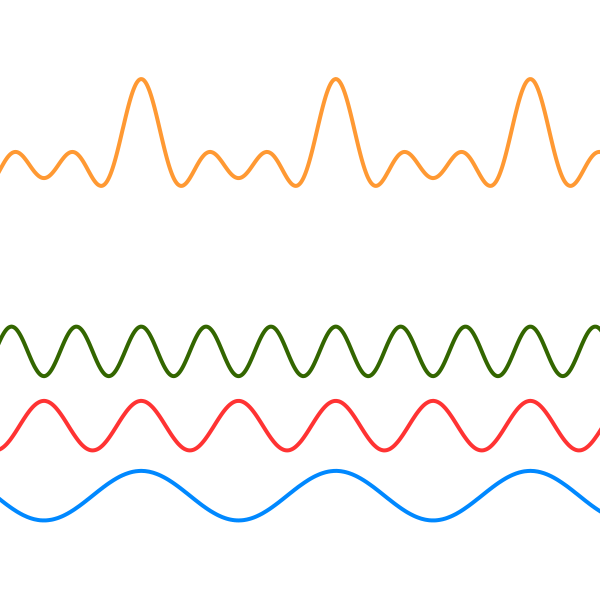
<p>A simple way to picture this is thinking about what happens with music. Let’s say, for the sake of the argument, that each note emitted by a piano can be represented as a sinusoidal wave<sup id="fnref:3" role="doc-noteref"><a href="#fn:3" class="footnote" rel="footnote">3</a></sup>. When you play a chord — namely more notes and once — you are producing a wave which is formed by summing all those waves.</p>

<figure>
  <img src="https://cdn-images-1.medium.com/max/2000/1*4dfCuldZ1t-GKvg5SekpWw.png" alt="Top wave (the chord wave) is the sum of bottom notes waves (the notes waves)" />
  
    <figcaption>Top wave (the chord wave) is the sum of bottom notes waves (the notes waves)</figcaption>
  
</figure>

<p>What you get then is a complex signal which is ultimately given by the sum of elementary signals. The peak of the chord wave (the yellow one) happens when all the three node waves are at their peak, whereas none of the bottoms of the chord wave are as low in comparison: this is due to the fact that there is no moment when the three of them are at their bottom concurrently.</p>

<h1 id="applications-in-everyday-life">Applications in everyday life</h1>

<p>Now, what you might be wondering how summing infinite things can lead to a non-infinite, hence meaningful, result. This problem is rather general in Mathematics, it is called <em>convergence</em> and unfortunately cannot be treated within this article because of its complexity.</p>

<p>However, one very evident thing can be observed here: to make this sum to not go to infinity (i.e. <em>diverge</em>), we need chunks which get smaller and smaller. This in turn implies that some items in the sum are holding the greatest part of the information needed to represent the original signal.</p>

<p>This last observation is what makes Spotify, Shazam, Instagram and even your iPhone’s guitar tuner app or noise canceling headphones possible.</p>

<p>In fact, when you are playing your music via Spotify you are not listening to the song exactly as it has been recorded. In order to provide a continuous data flow and keep the track going without needing to download it in advance, Spotify applies a compression algorithm which is meant to reduce file size enough to be streamed in real time.</p>

<p>What this algorithm does is:</p>

<ul>
  <li>
    <p>spot oscillations related to frequencies at end of or beyond the human audible spectrum and shave them off;</p>
  </li>
  <li>
    <p>remove the oscillations which do not hold a lot of information, namely the “rest” of the series.</p>
  </li>
</ul>

<p>The same principle applies to Shazam, SoundHound or even Siri and Google Assistant: when you provide a sound input, these software need to clean it, for example, removing frequencies which go beyond the average human voice spectrum and taking away minor oscillations. The actual search then happens comparing the coefficients of same oscillations between your input and a dataset.</p>

<p>Noise cancelling headphones work the same way: they have a microphone which records the ambient sound and calculates oscillations. Then they flip the oscillations so that the sum with the sound around you yields a silent wave. Eventually they inject this flipped wave in your mix so that frequencies outside of your music are not audible.</p>

<p>For images the things get a bit trickier because in that case we have to speak about two-dimensional Fourier Transform as the image signal spans across two dimensions. The underlying idea though stays the same: when we share a picture on Instagram, an algorithm chunks the image and applies the same kind of approximation we have seen above on every single pixel. This time around the computation happens on things like color spectrum and brightness and elements which live at the border of our perception are tossed away.</p>

<h2 id="conclusion">Conclusion</h2>

<p>Every time you will see your younger sister’s bathroom selfies on Instagram or you listen to a Ed Sheeran song on Spotify, now you know who to blame. Do you think that in hindsight Fourier would have spread this knowledge?</p>

<p>Until next time!</p>

<hr />

<div class="footnotes" role="doc-endnotes">
  <ol>
    <li id="fn:1" role="doc-endnote">
      <p>It was not his fault though: at that time we did not have a clear definition of integral nor of function. It was in fact impossible to prove Fourier’s Theorem from a modern perspective. <a href="#fnref:1" class="reversefootnote" role="doc-backlink">&#8617;</a></p>
    </li>
    <li id="fn:2" role="doc-endnote">
      <p>Mathematically speaking this is sooo wrong. Unfortunately we live in a faulty world, where most of the time engineers go with this kind of assumptions and and we settle for approximated solutions. <a href="#fnref:2" class="reversefootnote" role="doc-backlink">&#8617;</a></p>
    </li>
    <li id="fn:3" role="doc-endnote">
      <p>Actually each and every note is already a sum of sinusoidal waves. The set of waves which contributes to the sound of a note as we perceive it is called Harmonic Series and the single waves are called Harmonics. <a href="#fnref:3" class="reversefootnote" role="doc-backlink">&#8617;</a></p>
    </li>
  </ol>
</div>]]></content><author><name>Manuel Spagnolo</name></author><category term="tech" /><category term="music" /><category term="mathematics" /><summary type="html"><![CDATA[How Harmonic Analysis powers social networks, streaming channels and our every day life]]></summary></entry><entry><title type="html">HTTP Caching fundamentals</title><link href="https://shikaan.github.io/cache/frontend/backend/webdev/2019/01/06/cache-fundamentals.html" rel="alternate" type="text/html" title="HTTP Caching fundamentals" /><published>2019-01-06T00:00:00+00:00</published><updated>2019-01-06T00:00:00+00:00</updated><id>https://shikaan.github.io/cache/frontend/backend/webdev/2019/01/06/cache-fundamentals</id><content type="html" xml:base="https://shikaan.github.io/cache/frontend/backend/webdev/2019/01/06/cache-fundamentals.html"><![CDATA[<p>Clients and servers need to agree on certain rules in order to provide the performance benefits of caching techinques. These standards are usually already embedded in system we are working with (browsers, frameworks…), hence understanding what they are and how they work allows to pick the approach which better fits our needs case by case. The idea here is to have a go-to place where you can get an understanding or just dust off those concepts every time you have to deal with caching again.</p>

<h1 id="serving-the-correct-application-version">Serving the correct application version</h1>

<p>Serving the correct version of a web app started to become something you should be concerned about only “recently”.</p>

<p>Back in the days, we had server-side technologies like Java, JSP and PHP which used to serve thin client applications with small or no logic at all. Over time clients got thicker and we started splitting responsibilities between frontend and backend to the point where frontend and backend are usually two completely different applications<sup id="fnref:1" role="doc-noteref"><a href="#fn:1" class="footnote" rel="footnote">1</a></sup> which are just meant to communicate, rather than being “the same thing”.</p>

<p>When the application is run by the server, serving the correct version isn’t a concern, because the browser is usually just asking “that page” and the ball it’s in the server’s court with regards with deciding which version of that page to serve<sup id="fnref:2" role="doc-noteref"><a href="#fn:2" class="footnote" rel="footnote">2</a></sup>.</p>

<p>When the application lives on the client side, unfortunately, the page requested by the browser is usually an <code class="language-plaintext highlighter-rouge">index.html</code> with a <code class="language-plaintext highlighter-rouge">&lt;script&gt;</code> which includes the client application via an <code class="language-plaintext highlighter-rouge">src</code> attribute.</p>

<p>So if the <code class="language-plaintext highlighter-rouge">index.html</code> is something like</p>

<div class="language-html highlighter-rouge"><div class="highlight"><pre class="highlight"><code><span class="cp">&lt;!DOCTYPE html&gt;</span>
<span class="nt">&lt;html&gt;</span>
  <span class="nt">&lt;head&gt;</span>
    <span class="nt">&lt;title&gt;</span>Wonderful WebApp<span class="nt">&lt;/title&gt;</span>
  <span class="nt">&lt;/head&gt;</span>
  <span class="nt">&lt;body&gt;</span>
      <span class="nt">&lt;main</span> <span class="na">id=</span><span class="s">"app"</span><span class="nt">&gt;&lt;/main&gt;</span>

      <span class="nt">&lt;script </span><span class="na">src=</span><span class="s">"app.js"</span><span class="nt">&gt;&lt;/script&gt;</span>
  <span class="nt">&lt;/body&gt;</span>
<span class="nt">&lt;/html&gt;</span>
</code></pre></div></div>
<p>we could theoretically just bundle a different <code class="language-plaintext highlighter-rouge">app.js</code> every time keeping the <code class="language-plaintext highlighter-rouge">index.html</code> the same.</p>

<p>Unfortunately, that is not true any more. Browsers nowadays understand whether something changes<sup id="fnref:3" role="doc-noteref"><a href="#fn:3" class="footnote" rel="footnote">3</a></sup>, so rather than asking again <code class="language-plaintext highlighter-rouge">app.js</code>, they will just assume it never changed and serve the old one unless we communicate them to not do so.</p>

<p>One way of doing this is appending the version of the application as a query string parameter in the <code class="language-plaintext highlighter-rouge">src</code>.</p>

<div class="language-html highlighter-rouge"><div class="highlight"><pre class="highlight"><code><span class="cp">&lt;!DOCTYPE html&gt;</span>
<span class="nt">&lt;html&gt;</span>
  <span class="nt">&lt;head&gt;</span>
    <span class="nt">&lt;title&gt;</span>Wonderful WebApp<span class="nt">&lt;/title&gt;</span>
  <span class="nt">&lt;/head&gt;</span>
  <span class="nt">&lt;body&gt;</span>
      <span class="nt">&lt;main</span> <span class="na">id=</span><span class="s">"app"</span><span class="nt">&gt;&lt;/main&gt;</span>

      <span class="nt">&lt;script </span><span class="na">src=</span><span class="s">"app.js?v=1.2.3"</span><span class="nt">&gt;&lt;/script&gt;</span>
  <span class="nt">&lt;/body&gt;</span>
<span class="nt">&lt;/html&gt;</span>
</code></pre></div></div>

<p>Thus every time we bump a new version of the bundle, the browser is forced to perform a new request because the URL and the <code class="language-plaintext highlighter-rouge">index.html</code> changed.</p>

<p>Another similar (and by far more common nowadays) approach is naming the bundle with a hash which is different on every deploy. The hash can be based on the actual version, on the code, on the latest revision number or even the timestamp of the moment when the build happened.</p>

<div class="language-html highlighter-rouge"><div class="highlight"><pre class="highlight"><code><span class="cp">&lt;!DOCTYPE html&gt;</span>
<span class="nt">&lt;html&gt;</span>
  <span class="nt">&lt;head&gt;</span>
    <span class="nt">&lt;title&gt;</span>Wonderful WebApp<span class="nt">&lt;/title&gt;</span>
  <span class="nt">&lt;/head&gt;</span>
  <span class="nt">&lt;body&gt;</span>
      <span class="nt">&lt;main</span> <span class="na">id=</span><span class="s">"app"</span><span class="nt">&gt;&lt;/main&gt;</span>

      <span class="nt">&lt;script </span><span class="na">src=</span><span class="s">"app.gt8heef.js"</span><span class="nt">&gt;&lt;/script&gt;</span>
  <span class="nt">&lt;/body&gt;</span>
<span class="nt">&lt;/html&gt;</span>
</code></pre></div></div>

<p>This technique is rather popular and most of the time is “for free” in CLIs for popular frameworks (like Create React App, Angular CLI, Vue CLI, Ember CLI).</p>

<p>You can implement it yourself using a build tool which rewrites the <code class="language-plaintext highlighter-rouge">index.html</code> including the version number/hash or, eventually, using <code class="language-plaintext highlighter-rouge">manifest.json</code> to get more fine-grained control. Some references to help you with implementation:</p>

<ul>
  <li><a href="https://webpack.js.org/guides/caching/">Webpack - Caching</a> my preferred way;</li>
  <li><a href="https://medium.com/@felipebernardes/solving-browser-cache-hell-with-gulp-rev-6349a293abb9">Medium - Solving Browser Cache Hell With Gulp-Rev</a> a gentle introduction to <code class="language-plaintext highlighter-rouge">manifest.json</code>;</li>
  <li><a href="https://dzone.com/articles/use-gulp-to-bundle-minify-and-cache-bust">DZone - Use Gulp to bundle, minify and cache-bust</a> old, but still relevant;</li>
  <li><a href="http://thisisjessie.com/cache-busting-via-per-file-query-strings-with-make/">Jessie Wong - Cache busting with Makefile</a> a bit hardcore to me, but still an option.</li>
</ul>

<h1 id="optimize-content-delivery-with-service-workers">Optimize content delivery with Service Workers</h1>

<p>Among the things going hand in hand with <code class="language-plaintext highlighter-rouge">manifest.json</code> (especially with regards to Progressive Web Apps), we have Service Workers.</p>

<p>Without going too much in details about the awesome things you can do with service workers<sup id="fnref:4" role="doc-noteref"><a href="#fn:4" class="footnote" rel="footnote">4</a></sup>, you can imagine them as a JavaScript thread running in parallel in the browser whose life cycle is not bound to the client application’s one.</p>

<p>The reason why we are so interested in them here is that in Service Worker API we have access to the Cache Interface.</p>

<p>There are some caching recipes you can follow, but the most common are:</p>

<ul>
  <li>on install</li>
  <li>on user interaction</li>
  <li>on network response</li>
</ul>

<p>The naming convention is borrowed from one of the greatest resource on the matter you can find online, namely <a href="https://developers.google.com/web/fundamentals/instant-and-offline/offline-cookbook/">Google’s Offline Cookbook</a>.</p>

<p>If you followed what happened in previous episodes, you will certainly notice that the role played by Service Workers in those recipes is what in general we have called <em>Resource Manager</em>. Hence in the following paragraphs, I am about to show how those patterns map to what we said in previous articles.</p>

<p>Well, to be fair there’s another very good resource about this topic which is <a href="https://serviceworke.rs/caching-strategies.html">Mozilla’s Service Workers Cookbook - Caching Strategies</a>, but I find Google’s perspective easier to follow. I strongly encourage you to read both anyway to have a wider spectrum overview.</p>

<h2 id="on-install">On Install</h2>

<p>In this pattern we do a cache write on the <code class="language-plaintext highlighter-rouge">install</code> hook of the Service Worker. It looks particularly useful when you want to store the application shell to be able to provide an offline experience.</p>

<p>In the Google’s cookbook, this comes in two different fashions called “as a dependency” and “not as a dependency”, which are basically “Write Through” and “Write Behind” of <a href="/what-is-cache-part-ii">this article</a>.</p>

<h2 id="on-user-interaction">On User Interaction</h2>

<p>From a caching strategy perspective, this pattern is not that different from <code class="language-plaintext highlighter-rouge">On Install</code>.</p>

<p>Suppose you want to implement a “Read Later” button on a blog. What you need to do is fetch the article and store it. Deciding if you want to save is synchronously (as in “Write Through”) or asynchronously (as in “Write Behind”) depends on your use case, but both the approach are feasible.</p>

<h2 id="on-network-response">On Network Response</h2>

<p>Of the three examples we are providing, this is by far the most common since you can apply this strategy every time you need to fetch data over network.</p>

<p>The implementation proposed in the offline cookbook is “Read Through” - no more, no less!</p>

<h1 id="w3c-standards-http-headers">W3C standards: HTTP Headers</h1>

<p>In the wonderful world of web development, finding a new fancy way of being screwed is never a problem. This is precisely why you may want to understand how the browser communicates with the server with regards to cached content.</p>

<blockquote>
  <p><strong>Disclaimer</strong></p>

  <p>Even though I will always refer to the browser in the following paragraph, this also applies to server to server communication, so backenders could find this interesting as well.</p>
</blockquote>

<p>Again, I am treating only the most interesting cases, but here you can find a list of resources covering more cases:</p>

<ul>
  <li><a href="https://developer.mozilla.org/en-US/docs/Web/HTTP/Caching">MDN - HTTP Caching</a></li>
  <li><a href="https://www.digitalocean.com/community/tutorials/web-caching-basics-terminology-http-headers-and-caching-strategies">DigitalOcean - Web Caching Basics</a></li>
  <li><a href="https://www.keycdn.com/blog/http-cache-headers">KeyCDN - HTTP Cache Headers Explained</a></li>
  <li><a href="https://www.w3.org/Protocols/rfc2616/rfc2616-sec14.html#sec14.9">W3C - Cache-Control Specification</a></li>
  <li><a href="https://www.w3.org/Protocols/rfc2616/rfc2616-sec14.html#sec14.19">W3C - ETag Specification</a></li>
  <li><a href="https://developers.google.com/web/fundamentals/performance/optimizing-content-efficiency/http-caching">Google - HTTP Caching</a></li>
</ul>

<h2 id="etag">ETag</h2>

<p>Even though the name is not exactly explicit, the ETag HTTP Header is one of the headers we can use to have control over cached content. ETag stands for “Entity Tag” and it is a way of tagging with a hash a specific version of a content we are exchanging.</p>

<p>In this case, an example will be better than one thousand words.</p>

<p>Suppose you as a client (both another server or browser) are requesting <code class="language-plaintext highlighter-rouge">GET /dogs</code>. The counterpart will respond with a 200 and the following response headers:</p>

<div class="language-plaintext highlighter-rouge"><div class="highlight"><pre class="highlight"><code>200 OK
Content-length: 512
Cache-Control: max-age=60
ETag: a23g1t4
</code></pre></div></div>

<p>As we’ll see in the following sections, <code class="language-plaintext highlighter-rouge">max-age=60</code> tells us that the content will become stale in 60 seconds.</p>

<p>Suppose that after one minute, we request again the same resource but this time we attach the following request headers:</p>

<div class="language-plaintext highlighter-rouge"><div class="highlight"><pre class="highlight"><code>GET /dogs
If-None-Match: a23g1t4 
</code></pre></div></div>

<p>which basically means “give me either valid cached content or stale content as long as its version is a23g1t4”.</p>

<p>At this point the server will try to serve cached content, then falls back on stale content with that version and, if not even that is found, then it performs the actual request. In case the cached content is found the response will be:</p>

<div class="language-plaintext highlighter-rouge"><div class="highlight"><pre class="highlight"><code>304 Not Modified
Content-length: 512
Cache-Control: max-age=60
ETag: a23g1t4
</code></pre></div></div>

<h2 id="cache-control">Cache-Control</h2>

<p>The Cache-Control HTTP header is used to define a cache policy, both from a client side (for example, “don’t give me cached content”) and from a server side (for example, “this content will expire in two minutes”).</p>

<p>Cache-Control has <em>tons</em> of directives which can be combined in a lot of fancy ways which is impossible to cover in a couple of paragraphs. Maybe it makes sense to write a separate article on that (and if you’re interested, please let me know!). We’ll be covering here only the most common directives.</p>

<h3 id="no-cache--no-store"><code class="language-plaintext highlighter-rouge">no-cache</code> &amp; <code class="language-plaintext highlighter-rouge">no-store</code></h3>

<p>These two bad boys are probably the most mixed up.</p>

<p>The directive <code class="language-plaintext highlighter-rouge">no-store</code> - used both as a directive in <em>request headers</em> and <em>response headers</em> - simply means that any caching mechanism should be skipped. So the client should not cache the response it gets (when used in the request) and the server should not cache the response to speed up following requests (when used in the response).</p>

<p>When used as <em>response headers</em>, <code class="language-plaintext highlighter-rouge">no-cache</code> means that the content served won’t automatically be valid for subsequent requests. This basically means that the content can be cached or not, but, if it is, it has to be validated (for example using <code class="language-plaintext highlighter-rouge">ETag</code>) before being served.</p>

<p>When used as <em>request header</em>, <code class="language-plaintext highlighter-rouge">no-cache</code> means that we don’t care about what’s cached and we want a fresh request. However, this does not define whether the server can cache the response to speed up following requests (as opposed as <code class="language-plaintext highlighter-rouge">no-store</code>) and usually server will cache that response.</p>

<h3 id="public--private"><code class="language-plaintext highlighter-rouge">public</code> &amp; <code class="language-plaintext highlighter-rouge">private</code></h3>

<p>These look pretty obvious, but they actually hide a small quirk.</p>

<p><code class="language-plaintext highlighter-rouge">public</code> is most of the time useless and, in fact, you rarely find it. It just means “this content can be safely cached”, but usually you have other directives telling you that (for example <code class="language-plaintext highlighter-rouge">max-age</code>, as we’re about to see).</p>

<p><code class="language-plaintext highlighter-rouge">private</code> instead is a bit more tricky. It doesn’t mean that you cannot cache the response at all, but it rather says “you can cache that only if you own the content”.</p>

<p>What does being the owner of the information mean?</p>

<p>Suppose you have a micro-service built application with an API gateway in front of it. Every single service <em>and</em> the API gateway can have a cache, but only the micro-services themselves own the information. Usually, the content marked as <code class="language-plaintext highlighter-rouge">private</code> is just for one specific user, so only that user and the originator of that information can cache it.</p>

<p>Hence, in the example above, a browser could actually cache that information (as the user owns it) and the micro-service originating the information can, but the API gateway can’t and any eventually CDN in between can’t as well.</p>

<h3 id="max-age"><code class="language-plaintext highlighter-rouge">max-age</code></h3>

<p>When used in requests, <code class="language-plaintext highlighter-rouge">max-age=n</code> means that the client is willing to accept content which is not older than <code class="language-plaintext highlighter-rouge">n</code> seconds.</p>

<p>When used in responses, <code class="language-plaintext highlighter-rouge">max-age=m</code> means that the information delivered will be considered stale in <code class="language-plaintext highlighter-rouge">m</code> seconds.</p>

<h1 id="final-words">Final Words</h1>

<p>This is the end of this Christmas streak, but maybe not the end of this caching series. Who knows? There are a lot more things we can cover…</p>

<p>As always, if you have any feedback (e.g., why did you stop with memes? why are you so obsessed with caching? how could you complete a whole episode without mentioning food?) feel free to reach out.</p>

<p>Until next time!</p>

<hr />

<div class="footnotes" role="doc-endnotes">
  <ol>
    <li id="fn:1" role="doc-endnote">
      <p>We still have Server Side Rendered applications, but <em>usually</em> the backend layer responsible of rendering the client is still not taking care of other parts of business logic, making the whole thing still split to a certain extent. <a href="#fnref:1" class="reversefootnote" role="doc-backlink">&#8617;</a></p>
    </li>
    <li id="fn:2" role="doc-endnote">
      <p>This is not entirely true: there are ways to get stale content even with server rendered applications. We are going to treat how to get fresh content in this (and other cases) in the <a href="#http-headers">HTTP Headers section</a>. <a href="#fnref:2" class="reversefootnote" role="doc-backlink">&#8617;</a></p>
    </li>
    <li id="fn:3" role="doc-endnote">
      <p>We’ll dig a bit deeper on how browsers actually understand when to request fresh data or not in the <a href="#http-headers">HTTP Headers section</a> <a href="#fnref:3" class="reversefootnote" role="doc-backlink">&#8617;</a></p>
    </li>
    <li id="fn:4" role="doc-endnote">
      <p>I am not letting you down: <a href="https://developers.google.com/web/fundamentals/primers/service-workers/">here</a>’s a very good introduction by Google on the matter. <a href="#fnref:4" class="reversefootnote" role="doc-backlink">&#8617;</a></p>
    </li>
  </ol>
</div>]]></content><author><name>Manuel Spagnolo</name></author><category term="cache" /><category term="frontend" /><category term="backend" /><category term="webdev" /><summary type="html"><![CDATA[A walk-through of cache standards for browsers and servers]]></summary></entry><entry><title type="html">What is Cache? (Part II)</title><link href="https://shikaan.github.io/cache/frontend/backend/python/2018/12/25/what-is-cache-part-ii.html" rel="alternate" type="text/html" title="What is Cache? (Part II)" /><published>2018-12-25T00:00:00+00:00</published><updated>2018-12-25T00:00:00+00:00</updated><id>https://shikaan.github.io/cache/frontend/backend/python/2018/12/25/what-is-cache-part-ii</id><content type="html" xml:base="https://shikaan.github.io/cache/frontend/backend/python/2018/12/25/what-is-cache-part-ii.html"><![CDATA[<p>Caching upon fetching a resource can be achieved also without being aware of cache reading techninques: those scenarios are, in fact, the natural fit for cache and just a few things can go wrong. When modifying resources has to be taken in account, the situation can get tricky. Luckily though, there are some patterns to help us out with those situations which we are just about to discuss.</p>

<blockquote>
  <p><strong>Please Note</strong></p>

  <p>If you’re looking for an introduction about caching in general and reading techniques, you can go <a href="/what-is-cache">here</a></p>
</blockquote>

<h1 id="what-writing-techniques">What?! Writing techniques?!</h1>

<p>I totally see your surprise here. In the reading techniques we already mentioned how and when to write to Cache Layer, so why in the hell do we have a set of different strategies here?</p>

<p>We are calling <em>reading techniques</em> those which are actually concerned with reading actions. For example, <strong>get</strong> a list of transaction. So, even though we already performed some writing, we were actually performing writing only to serve the purpose of reading actions.</p>

<p>So, <em>writing techniques</em> are basically strategies used during write actions to populate or update Cache. The biggest part of the benefits you get out of them is, again, when you are going to read data afterwards. Examples of writing actions are: <strong>create</strong> a new transaction, <strong>edit</strong> user info and so forth.</p>

<p>As mentioned <a href="/what-is-cache">in the other article</a>, we are going to speak about these patterns:</p>
<ul>
  <li>Write Through</li>
  <li>Write Behind</li>
  <li>Write Around</li>
</ul>

<p>As last time, these are the participants:</p>
<ul>
  <li><strong>Client</strong>: who needs data;</li>
  <li><strong>Cache</strong>: where you store data;</li>
  <li><strong>Resource Manager</strong>: delivers resources to the Client;</li>
  <li><strong>Data Accessor</strong>: fetches data from outside the application.</li>
</ul>

<h2 id="write-through-aka-write-inline">Write Through (aka Write Inline)</h2>

<p>Exactly as for Read Through (or Cache Inline), we have the Resource Manager sitting in line between Client and Data Accessor.</p>

<p>This diagram illustrates the lifecycle of a writing action using Write Through</p>

<p><img src="https://thepracticaldev.s3.amazonaws.com/i/3s6w39l9kgew5qh2uc27.png" alt="Write Through." /></p>

<p>These are the steps:</p>

<ul>
  <li>Client starts a write action calling the Resource Manager;</li>
  <li>Resource Manager writes on Cache;</li>
  <li>Resource Manager writes calling Data Accessor;</li>
  <li>Response is served to the Client.</li>
</ul>

<h3 id="rationale">Rationale</h3>

<p>At first glance it doesn’t look like the smartest move: we are in fact slowing down the request adding an extra step. What are we gaining from this strategy, then?</p>

<p>As we have said multiple times, one of the biggest problems with cached data is that they get stale. Well, this pattern solves exactly this problem.</p>

<p>In the other article we have seen that one way to deal with stale entries is using <strong>TTL</strong>s and that still holds true, but in that case expiration was the best way to solve the issue since we were not producing the data we were fetching. Now we are in control of data we want to read, then updating the Cache every time we write data will ensure that cached entries <strong>never</strong> gets stale.</p>

<p>Of course there is no light without shadows and besides the write latency<sup id="fnref:1" role="doc-noteref"><a href="#fn:1" class="footnote" rel="footnote">1</a></sup>, this technique can turn detrimental when the Client doesn’t need to read data that often. In this case in fact, you end up wasting the resources needed to keep alive and synchronizing the Cache without gaining the reading benefits.</p>

<h2 id="write-behind-aka-write-back">Write Behind (aka Write Back)</h2>

<p>This other technique still has the Resource Manager inline, but writing through the Data Accessor happens asynchronously.</p>

<p><img src="https://thepracticaldev.s3.amazonaws.com/i/mvdo6l794dxudbo8sws1.png" alt="Write Behind." /></p>

<p>These are the steps involved in action life cycle:</p>
<ul>
  <li>Client starts a write action calling the Resource Manager;</li>
  <li>Resource Manager writes on Cache;</li>
  <li>Response is served to the Client;</li>
  <li>Eventually Resource Manager writes calling Data Accessor.</li>
</ul>

<h3 id="rationale-1">Rationale</h3>

<p>The best way to understand why and how this caching technique can be useful is to give an example.</p>

<p>Suppose we are now developing <code class="language-plaintext highlighter-rouge">TrulyAwesomeBankAPI</code> and we want to implement the <code class="language-plaintext highlighter-rouge">Payment</code> transaction creation using Cache. Payments need to happen as quick as possible, but <em>Truly Awesome Bank</em> backing our API is still on an old infrastructure which is not able to handle peaks very well.</p>

<p>We decide to use Write Behind. This means that every time we perform a <code class="language-plaintext highlighter-rouge">Payment</code> we save that transaction in Cache and return the response to the Client. Then we have another worker routine (running in background, in another process, based on a CRON expression or whatever…) which takes care of synchronizing our cached version of the ledger with the real ledger belonging to <em>Truly Awesome Bank</em>. This way we can provide responses quickly, regardless of how many requests <em>Truly Awesome Bank</em> is able to support at a given time.</p>

<p>We are then gaining on performance and stability, since we don’t need to wait for external data sources. This makes the architecture on the whole more fault tolerant towards external services and thus opens new resilience possibilities: we could, for example, implement simple retry strategy or even a circuit breaker without affecting the client at all…</p>

<p>The price we are paying though is consistency: before worker completes the synchronization process real data (as in data living in <em>Truly Awesome Bank</em>) and data we serve (as in data living in the Cache) are different and the thing can get a lot more complicated if we start thinking about how to deal with error cases<sup id="fnref:2" role="doc-noteref"><a href="#fn:2" class="footnote" rel="footnote">2</a></sup>.</p>

<h2 id="write-around">Write Around</h2>

<p>Well, just for sake of completeness we ought to mention Write Around, but to me it doesn’t look like a real pattern. In fact, in the following diagram you won’t find any trace of the word “cache”.</p>

<p><img src="https://thepracticaldev.s3.amazonaws.com/i/nis5pe9abormsp98zs76.png" alt="Write Around." /></p>

<p>Basically, <em>Write Around</em> is “call directly Data Accessor and cache data only at read time” which to me means “apply any reading strategy without a writing one”.</p>

<h3 id="rationale-2">Rationale</h3>

<p>The reason why you would use this non-pattern is just because none of the writing techniques above are good for you: maybe you need to have super consistent data or maybe you don’t need to read data that often.</p>

<p>In those cases not applying a writing technique (or using <em>Write Around</em>, if you wish) works just fine.</p>

<h1 id="did-you-write-some-code">Did you <em>write</em> some code?</h1>

<blockquote>
  <p>You can find a more detailed version of these examples <a href="https://github.com/shikaan/design-patterns">here</a></p>
</blockquote>

<p>Yes, I did. Python this time around.</p>

<p>The example I am providing here is simulating a slow writing external service using timers. In particular, we are about to simulate more or less what happens in <code class="language-plaintext highlighter-rouge">TrulyAmazingBankAPI</code>: we create a transaction we want to save.</p>

<p>Launch the app and in some seconds you are able to see exactly the trace of what happens during the <em>Write Through</em> and the <em>Write Behind</em> cases.</p>

<p>Let’s examine the output case by case.</p>

<p><strong>Write Though</strong></p>

<div class="language-plaintext highlighter-rouge"><div class="highlight"><pre class="highlight"><code>&gt;&gt;&gt; Save transaction
[14:59:17.971960] CacheManager.set
[14:59:17.971977] TrulyAwesomeBankAPIClient.save_transaction
&gt;&gt;&gt; Get transaction
[14:59:19.974781] CacheManager.get
</code></pre></div></div>

<p>Here the first thing we do is saving the entry in the Cache, then we save it in the AwesomeBank and when after a couple of seconds we want to get the transaction we have just saved, we are using the Cache to retrieve it.</p>

<p><strong>Write Behind</strong></p>

<div class="language-plaintext highlighter-rouge"><div class="highlight"><pre class="highlight"><code>&gt;&gt;&gt; Save transaction
[14:59:24.976378] CacheManager.set
&gt;&gt;&gt; Get transaction
[14:59:21.978355] CacheManager.get

--------------------------------------------
|    AWESOME BANK DATABASE (before sync)   |
--------------------------------------------
{}

[14:59:26.974325] TrulyAwesomeBankAPIClient.save_transaction

--------------------------------------------
|    AWESOME BANK DATABASE (after sync)    |
--------------------------------------------
{
   UUID('0f41f108-0859-11e9-a138-b46bfc6c5cb9'): {
      'id': UUID('0f41f108-0859-11e9-a138-b46bfc6c5cb9'), 
      'transaction': {
         'type': 'PAYMENT', 
         'amount': 100, 
         'currency': 'EUR'
      }
   }
}
</code></pre></div></div>
<p>If we call request the couple of actions “set transaction” and “get transaction”, we can see from the output that during the whole life of the request the only involved participant is CacheManager.</p>

<p>The sole moment when we are calling the TrulyAwesomeBankAPIClient is 5 seconds after the end of the request, when we are completing the synchronization.</p>

<p>Please note that also the synchronization is a process purposely dumb and slow because of timers here. In real world synchronization process can be (and usually is) way more complicated than that and, in fact, it should be a major concern when data consistency is a game changer.</p>

<p>After synchronization, as you can see database is up to date with what we have in Cache. From this point on this entry is up to date and it will always be, until other writing actions happen.</p>

<h1 id="final-words">Final words</h1>

<p>Well, this closes active caching part.</p>

<p>First thing, thanks for feedback on previous article! Apparently naming wasn’t so clear, so I updated it a bit here. I took the opportunity to revisit diagrams as well so that they won’t make you eyes bleed. Not that much at least.</p>

<p>Until next time!</p>

<hr />

<div class="footnotes" role="doc-endnotes">
  <ol>
    <li id="fn:1" role="doc-endnote">
      <p>It’s worth mentioning that users usually tolerate writing latency way better than reading latency. Unfortunately I can’t remember where I got this data from, so I cannot show real metrics of this. Take this with a grain of salt. <a href="#fnref:1" class="reversefootnote" role="doc-backlink">&#8617;</a></p>
    </li>
    <li id="fn:2" role="doc-endnote">
      <p>These issues are all related to what is generally named “Eventual Consistency” and this is the reason why I used the word “eventually” in the last step of the action life cycle. The topic is big enough to deserve an article on its own, but you really want to get a grasp of what’s going on <a href="https://www.youtube.com/watch?v=6R1WhWkh6pg">check this out</a>. <a href="#fnref:2" class="reversefootnote" role="doc-backlink">&#8617;</a></p>
    </li>
  </ol>
</div>]]></content><author><name>Manuel Spagnolo</name></author><category term="cache" /><category term="frontend" /><category term="backend" /><category term="python" /><summary type="html"><![CDATA[Caching upon fetching a resource can be achieved also without being aware of cache reading techninques: those scenarios are, in fact, the natural fit for cache and just a few things can go wrong. When modifying resources has to be taken in account, the situation can get tricky. Luckily though, there are some patterns to help us out with those situations which we are just about to discuss.]]></summary></entry><entry><title type="html">What is Cache?</title><link href="https://shikaan.github.io/cache/frontend/backend/node/javascript/2018/12/21/what-is-cache.html" rel="alternate" type="text/html" title="What is Cache?" /><published>2018-12-21T00:00:00+00:00</published><updated>2018-12-21T00:00:00+00:00</updated><id>https://shikaan.github.io/cache/frontend/backend/node/javascript/2018/12/21/what-is-cache</id><content type="html" xml:base="https://shikaan.github.io/cache/frontend/backend/node/javascript/2018/12/21/what-is-cache.html"><![CDATA[<p>Getting resources or performing complicated operations is usually both slow and expensive. The ability to store results of cumbersome operations to prevent them to happen again is called caching, which is the topic of this article.</p>

<h1 id="introduction">Introduction</h1>

<p>It took me just three episodes to become inconsistent in my writing schedule. It has to be a record of some sort. To keep me motivated though I decided to spend the season back in Italy, so that I <em>desperately</em> needed to practice some English.</p>

<p>Well it’s not entirely true: I am passing the season here because of food. As usual, this leads me to this article’s topic: <strong>caching</strong>.</p>

<p>Readers right now are probably divided into two groups: the one knowing the famous joke about caching and the others. For both of you here’s <a href="https://martinfowler.com/bliki/TwoHardThings.html">a curated list of tremendously sad variations of it</a>.</p>

<p>Needless to say, I find <strong>all of them</strong> hilarious.</p>

<p>Either way, this piece is going to be part of a Christmas series about caching techniques. I am about to cover <em>active caching</em> (as in, what I can do to cache without suffer too much) and <em>passive caching</em> (as in, how to stick with browser cache and similarities).</p>

<p>This article is the first in the <em>Active Caching</em> part.</p>

<h1 id="what-is-this-about">What is this about?</h1>

<p>Do you still wonder what has food to do with caching? You’d better do, else I need to seriously improve my cliffhangers skills.</p>

<h2 id="example-christmas-dinner">Example: Christmas Dinner</h2>

<p>Let’s start with a simple out-of-IT problem. It’s Christmas eve and you’re planning to arrange a mouthwatering dinner for you friends and family. For the sake of the argument we’re going to use one traditional Italian Christmas recipe: “il capitone”<sup id="fnref:1" role="doc-noteref"><a href="#fn:1" class="footnote" rel="footnote">1</a></sup>.</p>

<p>Let’s start cooking. First thing in the list of the ingredients is the eel. You call your favourite fish shop, you get your fish delivered. Second item, extra-virgin olive oil. You call your favourite farm, order a bottle of oil and you get that delivered. Third, lemon…</p>

<p>You can see by yourself how inconvenient this is, don’t you? What you start doing then is buying in advance and storing stuff in a more convenient place, closer to where you actually use it, to make the access to these ingredients more efficient. Let’s call this place cupboard.</p>

<p>Once you realize you can store things at home, you might be tempted to call the delivery person just once to collect all the ingredients not only for Christmas but also for New Year’s Eve’s dinner. So when you are at the fish shop, you buy the eel and the king prawns which you are actually planning to prepare a week later.</p>

<p>After a couple of days, the funky smell killing any living being in the area makes you realize that probably prawns are now expired and you should have prepared them fresh.</p>

<p>Well, caching has exactly the same kind of problems and perks: we usually cache items to save some computations, time or to avoid calling uselessly an external data source, but we should be extremely careful about expiration of entries because they can eventually get to an inconsistent (and very smelly) state down the line.</p>

<h2 id="caching-patterns">Caching patterns</h2>

<p>As usual, let me introduce some jargon<sup id="fnref:2" role="doc-noteref"><a href="#fn:2" class="footnote" rel="footnote">2</a></sup> which will help us in communication before diving into the patterns (maybe <em>strategies</em> is a better suited word here).</p>

<p>These are the participants:</p>

<ul>
  <li><strong>Client</strong>:
    <ul>
      <li>needs data (either fresh or from the cache);</li>
    </ul>
  </li>
  <li><strong>Data Access Component</strong>:
    <ul>
      <li>is called to get non-cached entries (e.g., HTTP Client, ORM…);</li>
    </ul>
  </li>
  <li><strong>Cache Layer</strong>:
    <ul>
      <li>stores cached entries (e.g., Memory, Local Storage…);</li>
    </ul>
  </li>
  <li><strong>Resource Manager</strong>:
communicates with the Cache Layer.</li>
</ul>

<p>In our previous example, these roles are mapped this way:</p>

<ul>
  <li><strong>Client</strong> is you;</li>
  <li><strong>Data Access Component</strong> is the delivery person;</li>
  <li><strong>Cache Layer</strong> your cupboard;</li>
  <li><strong>Resource Manager</strong> someone so kind to administer resources in your cupboard.</li>
</ul>

<p>Caching involves both <em>reading</em> (using the ingredients) and <em>writing</em> (storing the ingredients), so categorization follows accordingly. In this article we’ll speak about reading techniques.</p>

<p>Reading strategies:</p>
<ul>
  <li>Cache Inline</li>
  <li>Cache Aside</li>
</ul>

<p>Writing strategies:</p>
<ul>
  <li>Write Through</li>
  <li>Write Behind</li>
  <li>Write Around</li>
</ul>

<blockquote>
  <p><strong>Warning</strong></p>

  <p>Unfortunately naming convention for these patterns is not that consolidated, so you can find them under different names.</p>
</blockquote>

<p>To get an understanding of how does work and why we should use them, we will analyse the following scenarios for all the aforementioned patterns:</p>

<ul>
  <li>cached entry is present and valid (<strong>Cache Hit</strong>);</li>
  <li>cached entry is missing or invalid (<strong>Cache Miss</strong>).</li>
</ul>

<blockquote>
  <p><strong>Disclaimer</strong></p>

  <p>As usual, we are tackling these strategies in isolation for sake of simplicity. In real world, those techniques are combined to get the best out of them.</p>
</blockquote>

<h3 id="cache-inline-aka-read-through">Cache Inline (aka Read Through)</h3>

<p>The reason for this name is that in this pattern the Client is never responsible of calling the Data Access Component directly, but instead it delegates the responsibility of knowing whether a cached entry is enough or a fresh entry is required to the Resource Manager.</p>

<p>Resource Manager then sits <strong>in line</strong> between Client and Data Access Component.</p>

<h4 id="cache-miss">Cache Miss</h4>

<p><img src="https://thepracticaldev.s3.amazonaws.com/i/209c1ie202o6q6k77ml2.png" alt="Inline Cache Miss" /></p>

<p>Following the numbers on the arrows, you should easily get a grasp of what’s going on here:</p>

<p>1) Client asks Resource Manager for data;
2) Resource Manager gets no cached entries from cache, so it calls Data Access Component;
3) Resource Manager gets data, stores it and then returns it to Client.</p>

<h4 id="cache-hit">Cache Hit</h4>

<p><img src="https://thepracticaldev.s3.amazonaws.com/i/1vdzru4ptrnsp3tawz10.png" alt="Inline Cache Hit" /></p>

<p>As you can see, using cache here is reducing the number of steps, hence the strategy is actually working!</p>

<h4 id="rationale">Rationale</h4>

<p>From a caching standpoint, this approach makes sure that we are caching only data we actually use. This is usually called <strong>lazy caching</strong>. This approach also promotes splitting responsibilities across different components, how can it have drawbacks?!</p>

<p>Well, unfortunately this is the case :(</p>

<p>The first issue is of course that, when you are in a <em>Cache Miss</em> scenario, the request has to do a longer trip before getting to the Client, making the first request actually <em>slower</em> than if we didn’t have cache at all.</p>

<p>One way of dealing with this is doing a <em>cache primer</em>: when the system starts we pre-populate the Cache Layer so we’ll always be in a <em>Cache Hit</em> case. Obviously this will make our caching mechanism not-so-lazy. As always, what’s best depends on the actual scenario.</p>

<p>The second drawback is that, since data is cached only once (on <em>Cache Miss</em>) data can become quickly stale.</p>

<p>Again, this is not the end of the world: as for food, you can set <strong>expiration</strong> for entries. It is usually called <strong>TTL</strong> (namely <em>Time To Live</em>). When entries are expired, Resource Manager can call again the Data Access Component and refresh the cache<sup id="fnref:3" role="doc-noteref"><a href="#fn:3" class="footnote" rel="footnote">3</a></sup>.</p>

<h3 id="cache-aside">Cache Aside</h3>

<p>As opposed to Cache Inline, Cache Aside will make the Client responsible of communicating with Cache Layer to understand if a Cache Entry is needed or not.</p>

<p>The pseudo code for this behaviour can be as easy as:</p>

<div class="language-typescript highlighter-rouge"><div class="highlight"><pre class="highlight"><code><span class="kd">class</span> <span class="nx">Client</span> <span class="p">{</span>
    <span class="nx">CacheLayerManager</span> <span class="nx">cacheLayerManager</span><span class="p">;</span>
    <span class="nx">DataAccessComponent</span> <span class="nx">dataAccessComponent</span><span class="p">;</span>

    <span class="nx">getResource</span><span class="p">()</span> <span class="p">:</span> <span class="nx">Resource</span> <span class="p">{</span>
        <span class="kd">const</span> <span class="nx">resource</span> <span class="o">=</span> <span class="k">this</span><span class="p">.</span><span class="nx">cacheLayerManager</span><span class="p">.</span><span class="nx">getResource</span><span class="p">()</span>

        <span class="k">return</span> <span class="o">!</span><span class="nx">resource</span>
            <span class="p">?</span> <span class="k">this</span><span class="p">.</span><span class="nx">dataAccessComponent</span><span class="p">.</span><span class="nx">getResource</span><span class="p">()</span>
            <span class="p">:</span> <span class="nx">resource</span>
    <span class="p">}</span>
<span class="p">}</span>
</code></pre></div></div>

<h4 id="cache-miss-1">Cache Miss</h4>

<p><img src="https://thepracticaldev.s3.amazonaws.com/i/e5v9e78xb4gh4flfgtni.png" alt="Aside Cache Miss." /></p>

<p>You can follow what’s going on here by looking at the pseudo code above. As you can see, responsibility of calling Data Access Component is now in the Client and the Cache is actually… aside.</p>

<h4 id="cache-hit-1">Cache Hit</h4>

<p><img src="https://thepracticaldev.s3.amazonaws.com/i/ufun4iillk5rp4vugjsl.png" alt="Aside Cache Hit." /></p>

<p>Again the trip here is shorter, so the pattern is actually working.</p>

<h4 id="rationale-1">Rationale</h4>

<p>This technique, as Cache Aside, is a <em>lazy caching</em> technique, unless we want to do a <em>cache primer</em>. Also, exactly as with Cache Aside, there is the problem of stale data, but again that problem can be tackled with <em>TTL</em>.</p>

<p>So, why should anyone go for Cache Aside over Cache Inline?</p>

<p>Since the Client now is responsible of communicating directly with the Cache Layer, when the Resource Manager fails, we pay a penalty only on the first request - when we go through the <em>Cache Miss</em> path -, making our system on the whole more robust.</p>

<p>Also, having removed the dependency between what we cache and what we get from Data Access Component, we could potentially have two different kind of model: a <code class="language-plaintext highlighter-rouge">Model</code>, which is representing what we get from Data Access Componentm and <code class="language-plaintext highlighter-rouge">CachedModel</code> representing what we cache.</p>

<p>This will indeed widen the spectrum of what you can achieve with cache: you can, for example, hydrate or transform cached data to gain on performance on multiple operation with just one cached entry.</p>

<p>Let’s give an example of this.</p>

<p>Suppose you are serving a list of bank transactions you get from this <code class="language-plaintext highlighter-rouge">AwesomeBankAPI</code>. Your application is supposed to expose two different endpoints: <code class="language-plaintext highlighter-rouge">getAllTransactions</code> and <code class="language-plaintext highlighter-rouge">getPayments</code>. Of course <code class="language-plaintext highlighter-rouge">AwesomeBankAPI</code> does not expose any filtering function. What you could do is storing the the list of all the transactions on the first call to any of those endpoints.</p>

<p>From this point on, if the call is towards <code class="language-plaintext highlighter-rouge">getAllTransactions</code>, you return the list as is. If the call is towards <code class="language-plaintext highlighter-rouge">getPayments</code> you will take the whole list from cache (rather than calling <code class="language-plaintext highlighter-rouge">AwesomeBankAPI</code> again) and you just need to do the filtering on your end.</p>

<h1 id="code-or-it-never-happened">Code or it never happened</h1>

<blockquote>
  <p>You can find a more detailed version of these examples <a href="https://github.com/shikaan/design-patterns">here</a></p>
</blockquote>

<p>The <a href="https://github.com/shikaan/design-patterns/tree/master/chistmas-caching">example</a> I am showing here is written in Node. It’s a simple application meant to communicate with <a href="https://xkcd.com/">XKCD</a> to fetch latest comics.</p>

<p><code class="language-plaintext highlighter-rouge">CacheLayer</code> in this example is represented by a simple <code class="language-plaintext highlighter-rouge">Map</code>. I am using a <code class="language-plaintext highlighter-rouge">CacheManager</code> to deal with it, so that if you want to experiment with a real caching engine (like <a href="https://redis.io/">redis</a>, or <a href="https://memcached.org/">memcached</a>) you can do that without much effort.</p>

<p>The <code class="language-plaintext highlighter-rouge">DataAccessComponent</code> is represented by a simple <code class="language-plaintext highlighter-rouge">XKCDClient</code> which exposes (in a Vanilla JavaScript fashion…) only a <code class="language-plaintext highlighter-rouge">getLastComics</code> method.</p>

<p>The other component is indeed <code class="language-plaintext highlighter-rouge">ResourceManager</code> which is being used only in the inline-caching example.</p>

<p>Since all these components are eventually the same, I just created two different clients sharing and using them in different ways, based on the strategy we want to follow.</p>

<p>The <em>Cache Inline</em> example is about requesting twice the same resource (namely, last three XKCD comics), but the second time the request is way faster. This is because we are not doing any cache-primer, so the first time we are actually calling XKCD API, the second time we are retrieving information from the cache.</p>

<p>The <em>Cache Aside</em> example instead, shows how powerful can be caching when we want to request resources which can calculated from what we already have. In this specific example, we are fetching last five comics from XKCD and then we are fetching only last two. The second call of course is not calling the API.</p>

<p>The main difference here is then that we are using the cache to get a resource we <em>didn’t have</em> before, rather than using <code class="language-plaintext highlighter-rouge">CacheLayer</code> to get something we already fetched.</p>

<p>Again, those two strategies can (and usually do) live together. If you want to play a bit with these examples, you might try to make the <code class="language-plaintext highlighter-rouge">ResourceManager</code> from the first example a bit smarter so that it can either use the entries as they are (hence, what’s already in the <a href="https://github.com/shikaan/design-patterns/tree/master/chistmas-caching">repo</a>) or it can try to extract the required info from <code class="language-plaintext highlighter-rouge">CacheLayer</code> and decide whether calling the API or not.</p>

<h1 id="final-words">Final words</h1>

<p>This closes the first episode of this Christmas special (yes, as TV shows).</p>

<p>As you might have noticed I am trying to keep this shorter and easier than usual, so you can easily follow without your laptop when you are hallucinating because of Christmas-sized food portions.</p>

<p>As always, if you have any feedback (the thing is too simplified, you miss my memes, I suck at naming things), please drop a comment and make this better together :D</p>

<p>Until next time!</p>

<hr />

<div class="footnotes" role="doc-endnotes">
  <ol>
    <li id="fn:1" role="doc-endnote">
      <p>Pretty much anywhere else in Italy people eat meat for Christmas. I am from a messed up place where eating a giant eel should symbolize victory of Good against the Evil in the shape of a snake… <a href="#fnref:1" class="reversefootnote" role="doc-backlink">&#8617;</a></p>
    </li>
    <li id="fn:2" role="doc-endnote">
      <p>Unfortunately there no standard jargon here, so I had to make up these names. If you have any suggestions to improve them, please tell me (: <a href="#fnref:2" class="reversefootnote" role="doc-backlink">&#8617;</a></p>
    </li>
    <li id="fn:3" role="doc-endnote">
      <p>Knowing what is the right expiration date for every entry is something between wisdom and black magic. Most likely a lot of errors and trials (or experience, if you wish) will guide in choosing the best TTL for your case <a href="#fnref:3" class="reversefootnote" role="doc-backlink">&#8617;</a></p>
    </li>
  </ol>
</div>]]></content><author><name>Manuel Spagnolo</name></author><category term="cache" /><category term="frontend" /><category term="backend" /><category term="node" /><category term="javascript" /><summary type="html"><![CDATA[A gentle introduction to caching and cache techniques]]></summary></entry><entry><title type="html">Memento - Design Patterns in Web Development</title><link href="https://shikaan.github.io/javascript/typescript/react/design-patterns/2018/11/25/design-patterns-memento.html" rel="alternate" type="text/html" title="Memento - Design Patterns in Web Development" /><published>2018-11-25T00:00:00+00:00</published><updated>2018-11-25T00:00:00+00:00</updated><id>https://shikaan.github.io/javascript/typescript/react/design-patterns/2018/11/25/design-patterns-memento</id><content type="html" xml:base="https://shikaan.github.io/javascript/typescript/react/design-patterns/2018/11/25/design-patterns-memento.html"><![CDATA[<h1 id="introduction">Introduction</h1>

<p>As some of you may remember, in the <a href="/design-patterns-in-web-development-intro">pilot episode</a> I said I was about to explain <em>Command</em> with three examples: a UI kit, a CQRS application and an undo/redo implementation in Electron. In the <a href="/design-patterns-command">Command episode</a> though I didn’t provide the latter and the reason is extremely simple: I am a jerk.</p>

<p>Furthermore, it made much more sense to me using that example to explain another Behavioral Pattern<sup id="fnref:1" role="doc-noteref"><a href="#fn:1" class="footnote" rel="footnote">1</a></sup> belonging to the classic patterns in the <a href="https://en.wikipedia.org/wiki/Design_Patterns">Gang of Four</a>: <strong>Memento</strong>.</p>

<h1 id="memento">Memento</h1>

<h2 id="example-calculator">Example: Calculator</h2>

<p>Suppose you are working on a calculator. You provide an expression and it will do the maths for you. For simplicity’s sake, we just take in account one of its methods: <code class="language-plaintext highlighter-rouge">power</code>.</p>

<p>The logic behind this calculator is in a class called <code class="language-plaintext highlighter-rouge">Calculator</code> which should look something like:</p>

<div class="language-typescript highlighter-rouge"><div class="highlight"><pre class="highlight"><code><span class="kd">class</span> <span class="nx">Calculator</span> <span class="p">{</span>
    <span class="c1">// State</span>
    <span class="k">private</span> <span class="kr">string</span> <span class="nx">display</span><span class="p">;</span>
    <span class="c1">// and a whole lot of unrelated other fields</span>

    <span class="c1">// Resolves expressions like x^y</span>
    <span class="k">private</span> <span class="nx">power</span><span class="p">(</span><span class="kr">string</span> <span class="nx">expression</span><span class="p">):</span> <span class="kr">number</span><span class="p">;</span>

    <span class="c1">// Writes on display</span>
    <span class="nx">setState</span><span class="p">(</span><span class="kr">string</span> <span class="nx">display</span><span class="p">):</span> <span class="k">void</span><span class="p">;</span>

    <span class="c1">// Parse what's on the display, calculates and overrides the display</span>
    <span class="nx">calculate</span><span class="p">():</span> <span class="kr">number</span><span class="p">;</span>
<span class="p">}</span>
</code></pre></div></div>

<p>One fine day, we decide it’s time to implement an undo mechanism for this application. One first idea of implementing this mechanism could be simply apply the inverse function of what you just did.</p>

<p><img src="https://i.imgflip.com/1wg0hg.jpg" alt="Quick maths" /></p>

<p>Unfortunately this just does not work for the <code class="language-plaintext highlighter-rouge">power</code> function.</p>

<p>For example: undoing <code class="language-plaintext highlighter-rouge">y = power(x, 2)</code> is going to be applying <code class="language-plaintext highlighter-rouge">sqrt(y, 2)</code>, but both <code class="language-plaintext highlighter-rouge">power(2, 2)</code> and <code class="language-plaintext highlighter-rouge">power(-2, 2)</code> yield the same result, so you won’t be able to get unambiguously to the <code class="language-plaintext highlighter-rouge">x</code> just by having the <code class="language-plaintext highlighter-rouge">y</code>.</p>

<p>At this point saving the previous state in a snapshot when you <code class="language-plaintext highlighter-rouge">calculate</code> and, upon <code class="language-plaintext highlighter-rouge">undo</code>, using such snapshot to reset the state of the calculator looks simpler and more effective.</p>

<p><strong>Memento</strong> offers one neat way to deal with this problem.</p>

<h2 id="what-is-this-about">What is this about?</h2>

<blockquote>
  <p><strong>Intent</strong></p>

  <p>Without violating encapsulation, capture and externalize an object’s internal state so that the object can be restored to this state later.</p>
</blockquote>

<p>Yes, you have just won this “Guess the quote” round: it comes from the <em>Gang of Four</em>.</p>

<p>The idea here is pretty straightforward: we want to have a systematic way to store a snapshot of the internal state a given object, without exposing such state, in order to be able restore later on.</p>

<p><img src="https://i.pinimg.com/originals/99/40/8c/99408c1fba73591cf6fb4509cab8b87c.jpg" alt="Good Will Hunting" /></p>

<p>If you are wondering why you shouldn’t expose the state, maybe you are still not fearing coupling as you should. This is definitely bad. However, you are still in time to get this fixed by <a href="/design-patterns-command">reading this article</a>. I will wait for you here.</p>

<p>…</p>

<p>Done? We can get started with <strong>Memento</strong> in practice.</p>

<h2 id="pattern-in-practice">Pattern in practice</h2>

<p><img src="https://i.imgflip.com/2msosq.jpg" alt="99 problems" /></p>

<p>First things first: why this pattern is called Memento? <em>Memento</em> is a Latin word which can be safely translated into <em>reminder</em><sup id="fnref:2" role="doc-noteref"><a href="#fn:2" class="footnote" rel="footnote">2</a></sup>. This is the object in which we store the part of the state of the <code class="language-plaintext highlighter-rouge">Calculator</code> we are interested in.</p>

<p><code class="language-plaintext highlighter-rouge">Calculator</code>, which is where the state originates from, is called <strong>Originator</strong> and the third character of this story is going to be the one which takes care of making the whole thing work, which is called the <strong>CareTaker</strong>.</p>

<p>So, to wrap it up, these are the participants in Memento with their responsibilities:</p>

<ul>
  <li><strong>Originator</strong>:
    <ul>
      <li>creates a Memento to store the internal state;</li>
      <li>uses Mementos to restore its state;</li>
    </ul>
  </li>
  <li><strong>Memento</strong>:
    <ul>
      <li>stores an immutable snapshot of the internal state of Originator;</li>
      <li>can be accessed <em>only</em> by the Originator;</li>
    </ul>
  </li>
  <li><strong>Caretaker</strong>:
    <ul>
      <li>stores Mementos;</li>
      <li>never operates on or read Mementos;</li>
    </ul>
  </li>
</ul>

<p>In practice these will become something like:</p>

<div class="language-typescript highlighter-rouge"><div class="highlight"><pre class="highlight"><code><span class="c1">// Originator</span>
<span class="kd">class</span> <span class="nx">Calculator</span> <span class="p">{</span>
    <span class="k">private</span> <span class="kr">string</span> <span class="nx">display</span><span class="p">;</span>

    <span class="k">private</span> <span class="nx">power</span><span class="p">(</span><span class="kr">string</span> <span class="nx">expression</span><span class="p">):</span> <span class="kr">number</span><span class="p">;</span>
    
    <span class="nx">setState</span><span class="p">(</span><span class="kr">string</span> <span class="nx">display</span><span class="p">):</span> <span class="k">void</span><span class="p">;</span>
    <span class="nx">calculate</span><span class="p">():</span> <span class="kr">number</span><span class="p">;</span>
    <span class="nx">save</span><span class="p">():</span> <span class="nx">Snapshot</span><span class="p">;</span>
    <span class="nx">restore</span><span class="p">(</span><span class="nx">Snapshot</span> <span class="nx">snapshot</span><span class="p">):</span> <span class="k">void</span><span class="p">;</span> 
<span class="p">}</span>

<span class="c1">// Memento</span>
<span class="kd">class</span> <span class="nx">Snapshot</span> <span class="p">{</span>
    <span class="k">private</span> <span class="kr">string</span> <span class="nx">state</span><span class="p">;</span>

    <span class="nx">getState</span><span class="p">():</span> <span class="nx">state</span><span class="p">;</span>
<span class="p">}</span>

<span class="c1">// CareTaker</span>
<span class="kd">class</span> <span class="nx">Application</span> <span class="p">{</span>
    <span class="nx">Calculator</span> <span class="nx">calculator</span><span class="p">;</span>
    <span class="nb">Array</span><span class="o">&lt;</span><span class="nx">Snapshot</span><span class="o">&gt;</span> <span class="nx">undoSnapshots</span><span class="p">;</span>
    <span class="nb">Array</span><span class="o">&lt;</span><span class="nx">Snapshot</span><span class="o">&gt;</span> <span class="nx">redoSnapshots</span><span class="p">;</span>

    <span class="nx">calculate</span><span class="p">():</span> <span class="k">void</span> <span class="p">{</span>
        <span class="kd">const</span> <span class="nx">snapshot</span> <span class="o">=</span> <span class="k">this</span><span class="p">.</span><span class="nx">calculator</span><span class="p">.</span><span class="nx">save</span><span class="p">()</span>
        <span class="k">this</span><span class="p">.</span><span class="nx">undoSnapshots</span><span class="p">.</span><span class="nx">push</span><span class="p">(</span><span class="nx">snapshot</span><span class="p">)</span>
        <span class="k">this</span><span class="p">.</span><span class="nx">redoSnapshots</span> <span class="o">=</span> <span class="p">[]</span>
        <span class="k">this</span><span class="p">.</span><span class="nx">calculator</span><span class="p">.</span><span class="nx">calculate</span><span class="p">()</span>
    <span class="p">}</span>

    <span class="nx">undo</span><span class="p">():</span> <span class="k">void</span> <span class="p">{</span>
        <span class="kd">const</span> <span class="nx">snapshot</span> <span class="o">=</span> <span class="k">this</span><span class="p">.</span><span class="nx">undoSnapshots</span><span class="p">.</span><span class="nx">pop</span><span class="p">()</span>
        <span class="k">this</span><span class="p">.</span><span class="nx">redoSnapshots</span><span class="p">.</span><span class="nx">push</span><span class="p">(</span><span class="nx">snapshot</span><span class="p">)</span>
        <span class="k">this</span><span class="p">.</span><span class="nx">calculator</span><span class="p">.</span><span class="nx">restore</span><span class="p">(</span><span class="nx">snapshot</span><span class="p">)</span>
    <span class="p">}</span>

    <span class="nx">redo</span><span class="p">():</span> <span class="k">void</span> <span class="p">{</span>
        <span class="kd">const</span> <span class="nx">snapshot</span> <span class="o">=</span> <span class="k">this</span><span class="p">.</span><span class="nx">redoSnapshots</span><span class="p">.</span><span class="nx">pop</span><span class="p">()</span>
        <span class="k">this</span><span class="p">.</span><span class="nx">undoSnapshots</span><span class="p">.</span><span class="nx">push</span><span class="p">(</span><span class="nx">snapshot</span><span class="p">)</span>
        <span class="k">this</span><span class="p">.</span><span class="nx">calculator</span><span class="p">.</span><span class="nx">restore</span><span class="p">(</span><span class="nx">snapshot</span><span class="p">)</span>
    <span class="p">}</span>
<span class="p">}</span>
</code></pre></div></div>

<h2 id="nice-how-can-i-use-this-st-tomorrow">Nice! How can I use this s**t tomorrow?</h2>

<p>With <strong>Memento</strong> we are kind of lucky: you don’t need to find super complex use cases to go for it. The undo/redo scenario is by far the most common place where this pattern shines, but it can easily be reused every time you need to revert an object to a previous stage.</p>

<p>You need another example, don’t you?</p>

<p>Suppose you have a profile age for a web application. The user clicks on “edit profile” but, after doing some things, they “cancel” the operation. Unless you wan to do the AJAX call to re-get user information every time this happens, a good idea can be storing a Memento containing a snapshot of the user profile to be restored upon cancellation.</p>

<p>Is <strong>Memento</strong> the <em>only</em> way to achieve this? No. Another fairly common pattern to go for in these cases is <strong>Prototype</strong>, which might be the subject of next episode. Or not, who knows? Either way, all you need to know now about <strong>Prototype</strong> is that it provides another way to create a copy of the state of an object, but in a different manner.</p>

<p>Bottom line, taking snapshots makes your life easier when you have to time-travel the history of your objects.</p>

<p><img src="https://memegenerator.net/img/instances/64082371/yo-dawg-i-heard-you-like-snapshots-so-i-snapshotted-your-snapshot-so-you-can-snapshot-your-snapshot.jpg" alt="Snapshots" /></p>

<p>Your next question could be, is this just convenient or it is necessary? We have seen in the Calculator example that sometimes inverting last action could not be enough to get to the previous state. This is unfortunately true not only with non-invertible maths functions, but it applies every time any of your methods has side effects. In these cases usually taking snapshots is the only way to revert to a previous state safely.</p>

<h2 id="well-wheres-the-catch-then">Well, where’s the catch then?</h2>

<p>This pattern has a couple of gotchas you should be very aware of.</p>

<p>The first and most obvious one is that, if the object you want to restore is big, having a history of snapshots can become cumbersome. One way to work this around is storing just a diff of the changes, but this works only in scenarios in which you know exactly the order of snapshots to apply (for example in undo/redo).</p>

<p>The other, sneakier, is that snapshots, if not created correctly, can easily create and accumulate errors upon traversing the history. Let’s give an example of this case.</p>

<p>Let’s suppose you have the dumbest game ever: every time you click a button you earn 10 points, if score gets to 100 you earn a badge. We want to implement an undo mechanism here, so we store snapshots on every click of the <code class="language-plaintext highlighter-rouge">score</code> variable.</p>

<p>We click up to 100, we earn a badge, we undo, we re-click and we earn a second badge.</p>

<p><img src="./bug-feature-meme.jpg" alt="Bug feature" /></p>

<p>Why did that happen? Because we forgot to keep track of the badges in the snapshot, thus on undo we just reverted the score, without cleaning the badge list.</p>

<h1 id="a-little-less-conversation-a-little-more-action-please">A little less conversation, a little more action, please</h1>

<blockquote>
  <p>You can find a more detailed version of these examples <a href="https://github.com/shikaan/design-patterns">here</a></p>
</blockquote>

<p>Finally code time!</p>

<p>As I promised in the introduction, I am about to show how the same undo problem can be solved both via Command and via Memento.</p>

<blockquote>
  <p><strong>Disclaimer</strong></p>

  <p>I decided to not use Electron for this example for the simple reason that it makes the whole thing more complicated for people not familiar with it and it’s not bringing any value to Electron experts. If you’re really upset about this, drop a comment and I will add also that example.</p>
</blockquote>

<p>The example is a very simple React application which is supposed to be a game: sort the tiles to win.</p>

<p>It basically sets a listener on <code class="language-plaintext highlighter-rouge">keyDown</code> and based on that it either calls a method (Memento) or issues a command (Command).</p>

<p>In the Memento example we have the <code class="language-plaintext highlighter-rouge">Game</code> component which is dealing with all the game logic: moving tiles, selecting tiles, calculate if the user is winning… This makes it the perfect <strong>Originator</strong>, because it’s also where we store the state we might want to revert via undo. Being the Originator also means that it’s responsible of creating and restoring the <code class="language-plaintext highlighter-rouge">Snapshot</code>s.</p>

<p><code class="language-plaintext highlighter-rouge">Snapshot</code> is of course <strong>Memento</strong> and it’s “private” to the <code class="language-plaintext highlighter-rouge">Game</code> ES6-module, to prevent the <code class="language-plaintext highlighter-rouge">KeyboardEventHandler</code> (aka the <strong>CareTaker</strong>) to know it.</p>

<p>In the Command example, we have an additional component: <code class="language-plaintext highlighter-rouge">CommandManager</code> acting as <strong>Invoker</strong>. Roles of <code class="language-plaintext highlighter-rouge">Game</code> and <code class="language-plaintext highlighter-rouge">KeyboardEventHandler</code> are unchanged, but given the different implementation, they are doing things differently. <code class="language-plaintext highlighter-rouge">Game</code> now is the <strong>Receiver</strong> of the command, whereas <code class="language-plaintext highlighter-rouge">KeyboardEventHandler</code> is the <strong>Client</strong>, the sole owner of <code class="language-plaintext highlighter-rouge">Command</code>.</p>

<p>As you might already have noticed, we can use interchangeably <strong>Command</strong> and <strong>Memento</strong> here because the action we are encapsulating (<code class="language-plaintext highlighter-rouge">moveSelectedTile</code>) is a pure action, with no side effects, so we actually <em>don’t necessarily need</em> a Snapshot to reconstruct the state: applying inverse functions is enough.</p>

<p>Does this mean that Memento and Command <em>cannot</em> live together? By no means. As a matter of fact, you can encapsulate in a Command the <code class="language-plaintext highlighter-rouge">takeSnaphot</code> method to decouple the <code class="language-plaintext highlighter-rouge">CareTaker</code> and the <code class="language-plaintext highlighter-rouge">Originator</code>. Or also, you can encapsulate <code class="language-plaintext highlighter-rouge">moveSelectedTile</code> - as we already did - and in the Command, besides executing the method, you also take a snapshot. This last one is the most common way to make Command and Mememto live together.</p>

<p>You can start from <a href="https://github.com/shikaan/design-patterns/tree/master/2-memento">the repo</a> and experiment with it as an exercise. If you’re evil and want to spoil everyone else’s party, you can submit a PR.</p>

<h1 id="final-words">Final words</h1>

<p>Well, things start to become a bit more exciting as we start adding knowledge and mixing cards on the table. This will definitely improve over time, so hang on for it :D</p>

<p>If you have any sort of feedback (“Don’t tell me how to code. You’re not my real mom!”), opinion (“You code like shit, but your memes are awesome”), comment (“Yeah, okay, Behavioral Patterns are cool, what’s next?”), please drop a message or a comment and let’s make this series better together.</p>

<p>Until next time!</p>

<hr />

<div class="footnotes" role="doc-endnotes">
  <ol>
    <li id="fn:1" role="doc-endnote">
      <p>If you’re unsure about what a behavioral pattern is, take a look <a href="/design-patterns-command">here</a> <a href="#fnref:1" class="reversefootnote" role="doc-backlink">&#8617;</a></p>
    </li>
    <li id="fn:2" role="doc-endnote">
      <p>To avoid to forget this, you should keep in mind that <strong>mem</strong>ento and <strong>mem</strong>ory share the same origin. A memory trick to memorize something related to memory. Boom! <a href="#fnref:2" class="reversefootnote" role="doc-backlink">&#8617;</a></p>
    </li>
  </ol>
</div>]]></content><author><name>Manuel Spagnolo</name></author><category term="javascript" /><category term="typescript" /><category term="react" /><category term="design-patterns" /><summary type="html"><![CDATA[Second episode about Behavioral Pattern Memento]]></summary></entry><entry><title type="html">Command - Design Patterns in Web Development</title><link href="https://shikaan.github.io/javascript/python/architecture/design-patterns/2018/11/10/design-patterns-command.html" rel="alternate" type="text/html" title="Command - Design Patterns in Web Development" /><published>2018-11-10T00:00:00+00:00</published><updated>2018-11-10T00:00:00+00:00</updated><id>https://shikaan.github.io/javascript/python/architecture/design-patterns/2018/11/10/design-patterns-command</id><content type="html" xml:base="https://shikaan.github.io/javascript/python/architecture/design-patterns/2018/11/10/design-patterns-command.html"><![CDATA[<h1 id="introduction">Introduction</h1>

<p>As spoiled in the introduction, the first article will be about the <em>Command Pattern</em>. This pattern is one of the classic patterns you can find in the <a href="https://en.wikipedia.org/wiki/Design_Patterns">Gang of Four</a> and it belongs to the set of patterns called <strong>Behavioral Patterns</strong>.</p>

<h2 id="behavioral-patterns">Behavioral Patterns</h2>

<p>As the name suggest, behavioral patterns are concerned about behavior of objects.</p>

<p>Unlike other kind of patterns, behavioral patterns are not only patterns of objects and classes, but also pattern of communication between them. Their main purpose is to outline and distribute responsibilities across components in the application using abstractions meant to simplify complex control flow.</p>

<p>This last sentence was complicated enough to deserve a real life example.</p>

<p>Let’s say you are in a restaurant and you want to eat a juicy T-Bone steak (I guess now it’s obvious I have something for food). One way of getting that is to stand-up, going into the kitchen, and asking the chef to prepare a steak for you. At that point you realize that the kitchen is full of people with the same bright idea which are ultimately creating chaos and confusion in kitchen staff. Only one thing can be worse: your former girlfriend/boyfriend, yes the one with a thing for poisons, is the chef.</p>

<p><img src="https://i.pinimg.com/originals/c4/b8/83/c4b8834dc60dd504f287b7a1232bc34e.jpg" alt="Sad Panda" /></p>

<p>As a matter of fact, a customer is only interested in getting food. Direct communication with the chef is not serving this purpose and it’s actually only bringing problems. At the same time, this direct communication does not scale when you have multiple requests and it wouldn’t even when you have multiple listeners for those requests. This is a perfect example of the kind of problems that <em>coupling</em> can bring in software development.</p>

<p>The good news though is that even before software development was invented, human beings found a way to solve this obnoxious issue: placing orders.</p>

<p>Let’s suppose, for the sake of the argument, to have a mailbox attached to the kitchen door. Whenever you want to have your food, you just write everything you need on a piece of paper and you mail your order.</p>

<p>This simple trick magically solved our issues. We are not forced to know who is cooking our food. We don’t even know whether anyone is actually cooking our food or if they buy-resell, for example. This means a huge gain in flexibility (and maybe a bit of loss of trust in restaurants which work this way). Furthermore, this improved the whole process in the kitchen, as they can prioritize, prepare concurrently, throw in the bin, log or do whatever they want with the orders.</p>

<p>Everyone (panda included) lived happily ever after<sup id="fnref:1" role="doc-noteref"><a href="#fn:1" class="footnote" rel="footnote">1</a></sup>!</p>

<p>Oh, by the way, this was the Command Pattern.</p>

<h1 id="command-pattern">Command Pattern</h1>

<h2 id="what-is-this-about">What is this about?</h2>

<p>Lets start with a quote from the one and only GoF.</p>

<blockquote>
  <p><strong>Intent</strong></p>

  <p>Encapsulate a request as an object, thereby letting you parameterize clients with different requests, queue or log requests, and support undoable operations.</p>
</blockquote>

<p>In substance, Command is all about encapsulating a routine in an object. In the example above, we encapsulated the request for food in an object, which was the piece of paper used to place the order. The encapsulating object is what we call <code class="language-plaintext highlighter-rouge">Command</code>, hence the name of the pattern<sup id="fnref:2" role="doc-noteref"><a href="#fn:2" class="footnote" rel="footnote">2</a></sup>.</p>

<h2 id="effects">Effects</h2>

<p>Applying command has mainly two effects: reducing coupling between the invoker and the executor of the command, make a routine a first class object.</p>

<p>The ex scenario in the example above should be enough to convince you that coupling can be dangerous even outside Computer Science.</p>

<p>If you’re not in the mood for thinking about your paranoid acquaintances you can also consider that the procedure you had to fulfill to get your meal is essentially unchanged if your meal needs to be cooked by two teams one specialized in steaks and one in sides.</p>

<p>At the same time, the kitchen staff does not care if the order comes from the waiter, from a phone call, an order or whatever. As long as they receive a command they can execute, they are fine.</p>

<p>This is just a part of the gain we have in transforming routines in objects. The best part is… wait for it… they are objects! That means you can manipulate routines as objects, as in you can store them to have a transaction history, you can delay the execution, you can ignore them if s**t comes out of the pipe, you can extend those to add debugging inspections, you name it!</p>

<h2 id="awesome-will-i-ever-need-this-in-my-lifetime">Awesome! Will I ever need this in my lifetime?</h2>

<p>No.</p>

<p><img src="https://sayingimages.com/wp-content/uploads/yo-dawg-im-just-kidding-meme.jpg" alt="Just kidding" /></p>

<p>There are some situations in which <strong>Command</strong> is not only extremely handy, but almost needed.</p>

<h3 id="callbacks">Callbacks</h3>

<p>Every time the executor of a command and the issuer not only they don’t know each other, but they <em>cannot</em> know each other in advance.</p>

<p>Let’s say you are developing a fancy UI kit. You are of course developing something that needs to be reused, so if you build a <code class="language-plaintext highlighter-rouge">Button</code> component, you want it to be able to execute <em>any</em> action, you don’t want to hard-code one.</p>

<p>“Hey, bro! We have callbacks for that!” Yes, I know, but not everyone in the world is so lucky to work with JavaScript on a daily basis (sorry, biased comment). When you want to (or have to) be strictly Object Oriented, this is the way to implement callbacks.</p>

<h3 id="transactions-and-logs">Transactions and logs</h3>

<p>Having all the commands as first class objects allows you to store them and hence to create an history of transactions.</p>

<p>This comes extremely handy in systems in which you <em>need</em> a transaction history, like banking, for example. Furthermore, you get another pleasant side effect: you can reconstruct the state of the system at any point in time just traveling back the transaction history, making your life extremely easier if something goes off.</p>

<p>You can of course do the other way around: instead of storing the commands after executing them as a reference for what already happened, you can make the list of commands a queue of task to be executed, as within the restaurant example.</p>

<p>If you need more “workforce”, you just need to add some more consumers for that queue, making your application on the whole more scalable.</p>

<h3 id="undoredo">Undo/Redo</h3>

<p>Making the execution of an action an object, allows you to create an object with two methods: <code class="language-plaintext highlighter-rouge">execute</code> and <code class="language-plaintext highlighter-rouge">undo</code>. The first is meant to do something, whilst the latter is supposed to undo what you have just done.</p>

<p>Add up what’s above about transactions and you can easily build and undo/redo history.</p>

<h2 id="one-last-effort-before-code">One last effort before code…</h2>

<p>Before diving into code examples we need to build a bit of jargon, so we can understand each other. I will be using the exact same language as used in GoF, so that if you want to follow from there it will be easier.</p>

<p>The participants in this pattern are:</p>

<ul>
  <li><strong>Receiver</strong>:
    <ul>
      <li>knows how to execute the command;</li>
    </ul>
  </li>
  <li><strong>Command</strong>:
    <ul>
      <li>declares the interface for executing an operation;</li>
    </ul>
  </li>
  <li><strong>Concrete Command</strong>:
    <ul>
      <li>defines the binding between the Receiver and the action to execute;</li>
      <li>invokes methods on the Receiver to fulfill the request;</li>
    </ul>
  </li>
  <li><strong>Client</strong>
    <ul>
      <li>creates the Concrete Command and sets its Receiver;</li>
    </ul>
  </li>
  <li><strong>Invoker</strong>
    <ul>
      <li>issues the request to execute the command;</li>
    </ul>
  </li>
</ul>

<p>In the example restaurant example we would have:</p>

<ul>
  <li><code class="language-plaintext highlighter-rouge">Cook</code> as <em>Receiver</em></li>
  <li><code class="language-plaintext highlighter-rouge">Order</code> as <em>Concrete Command</em></li>
  <li><code class="language-plaintext highlighter-rouge">Restaurant</code> as <em>Client</em></li>
  <li><code class="language-plaintext highlighter-rouge">Customer</code> as <em>Invoker</em></li>
</ul>

<p>Some pseudocode to look a bit more serious:</p>

<div class="language-typescript highlighter-rouge"><div class="highlight"><pre class="highlight"><code><span class="kr">interface</span> <span class="nx">Command</span> <span class="p">{</span>
    <span class="kd">function</span> <span class="nx">execute</span><span class="p">()</span>
<span class="p">}</span>

<span class="c1">// Concrete Command</span>
<span class="kd">class</span> <span class="nx">Order</span> <span class="k">implements</span> <span class="nx">Command</span> <span class="p">{</span>
    <span class="nx">Cook</span> <span class="nx">cook</span><span class="p">;</span>
    <span class="nx">Meal</span> <span class="nx">meal</span><span class="p">;</span>

    <span class="nx">execute</span><span class="p">()</span> <span class="p">{</span>
        <span class="nx">cook</span><span class="p">.</span><span class="nx">prepare</span><span class="p">(</span><span class="nx">meal</span><span class="p">);</span>
    <span class="p">}</span>
<span class="p">}</span>

<span class="c1">// Receiver</span>
<span class="kr">interface</span> <span class="nx">Cook</span> <span class="p">{</span>
    <span class="kd">function</span> <span class="nx">prepare</span><span class="p">(</span><span class="nx">Meal</span> <span class="nx">meal</span><span class="p">)</span>
<span class="p">}</span>

<span class="c1">// Invoker</span>
<span class="kd">class</span> <span class="nx">Customer</span> <span class="p">{</span>
    <span class="nx">Order</span> <span class="nx">order</span><span class="p">;</span>
    <span class="nx">Meal</span> <span class="nx">meal</span><span class="p">;</span>

    <span class="nx">mailOrder</span><span class="p">(</span><span class="nx">Order</span> <span class="nx">order</span><span class="p">)</span> <span class="p">{</span>
        <span class="nx">order</span><span class="p">.</span><span class="nx">execute</span><span class="p">()</span>
    <span class="p">}</span>
<span class="p">}</span>

<span class="c1">// Client</span>
<span class="kd">class</span> <span class="nx">Restaurant</span> <span class="p">{</span>
    <span class="nx">Cook</span> <span class="nx">cook</span><span class="p">;</span>
    <span class="nx">Customer</span> <span class="nx">customer</span><span class="p">;</span>

    <span class="nx">main</span><span class="p">()</span> <span class="p">{</span>
        <span class="nx">order</span> <span class="o">=</span> <span class="k">new</span> <span class="nx">Order</span><span class="p">(</span><span class="nx">cook</span><span class="p">,</span> <span class="nx">customer</span><span class="p">.</span><span class="nx">meal</span><span class="p">)</span>
        <span class="nx">customer</span><span class="p">.</span><span class="nx">mailOrder</span><span class="p">(</span><span class="nx">order</span><span class="p">)</span>
    <span class="p">}</span>
<span class="p">}</span>

</code></pre></div></div>

<h1 id="code-examples">Code examples</h1>

<blockquote>
  <p>You can find a more detailed version of these examples <a href="https://github.com/shikaan/design-patterns">here</a></p>
</blockquote>

<h2 id="frontend-ui-kits">Frontend: UI kits</h2>

<p>Following the first example above, here you are a simple example of how you can use the Command Pattern on the frontend. I have chosen to not use any framework, as the idea is general enough to be applied also to vanilla JavaScript.</p>

<p>In this example we will just create and render a <code class="language-plaintext highlighter-rouge">Button</code> component (Invoker) which will execute an <code class="language-plaintext highlighter-rouge">OpenAlertCommand</code> (Concrete Command). The Window (Receiver) is actually responsible for doing the job, whilst Application (Client) is wrapping everything up.</p>

<p><code class="language-plaintext highlighter-rouge">gist:shikaan/77367e98e41351549bec891fbf626b43</code></p>

<p>You may argue that doing the same thing without the pattern would have taken less then 10 LOC. You are actually right, but, for the reasons we discussed earlier, this scales better and will be more flexible when you will get new requirements.</p>

<p>In <a href="https://github.com/shikaan/design-patterns">the repo</a> we are actually proving how more flexible this is, adding to this example a couple of other things: we reuse the same button with the same command with two different receivers, we use the same button to trigger two different commands at the same time.</p>

<h2 id="backend-cqrs-in-python">Backend: CQRS in Python</h2>

<blockquote>
  <p>A good introductory article on the matter is <a href="https://medium.com/eleven-labs/cqrs-pattern-c1d6f8517314">here</a>.</p>
</blockquote>

<p>The following example will contain a <strong>super simple</strong> CQRS application written in Python. It’s supposed to be a banking app in which you can only deposit and get the list of all the deposits. Everything is stored in memory and will vanish as soon as the process ends.</p>

<p>The architecture of the app, even though it’s super basic, contains everything you need to call it a CQRS app.</p>

<p><img src="https://thepracticaldev.s3.amazonaws.com/i/ilcdtdi5oyd24cz9dq7i.png" alt="Diagram" /></p>

<p>Strap yourselves because here we have two concurrent implementation of the Command Pattern: one for writing (Command) and one for reading (Queries). Both share the same Client though.</p>

<p>1) The Application (Client) creates the <code class="language-plaintext highlighter-rouge">Deposit</code> command and calls the <code class="language-plaintext highlighter-rouge">handle_deposit</code> method on the Command Handler (Command Invoker) 
2) The WriteStore (Command Receiver) saves data
3) Right after the Command Handler fires an event to notify the ReadStore (Query Receiver) which updates
4) The Application (Client) then creates the <code class="language-plaintext highlighter-rouge">GetLastDeposit</code> query and calls the <code class="language-plaintext highlighter-rouge">handle</code> method on the QueryHandler (Query Invoker)
5) The ReadStore (Query Receiver) will then save the value into the query
6) The result stored in the query returns to the user</p>

<p>The code for this is of course available in <a href="https://github.com/shikaan/design-patterns">the repo</a>. Python is not my main language, so if you see something off, feel free to submit a pull request or open an issue there.</p>

<h2 id="final-words">Final words</h2>

<p>Well, this has been massive. Hopefully you got to read at least half of what I have written :D As always, if you have any feedback about how to make this series better, please let me know.</p>

<p>Until next time!</p>

<hr />

<div class="footnotes" role="doc-endnotes">
  <ol>
    <li id="fn:1" role="doc-endnote">
      <p>This kind of patterns actually modified the <em>behavior</em> (in common English sense) of customers and cooks. Hopefully this will be enough to fix forever in your mind what a <em>behavioral</em> pattern is. <a href="#fnref:1" class="reversefootnote" role="doc-backlink">&#8617;</a></p>
    </li>
    <li id="fn:2" role="doc-endnote">
      <p>You language geeks may want to know that “order” in the restaurant context in Italian it’s actually called “comanda”. Just one word to remember both the pattern and the example. Lovely. <a href="#fnref:2" class="reversefootnote" role="doc-backlink">&#8617;</a></p>
    </li>
  </ol>
</div>]]></content><author><name>Manuel Spagnolo</name></author><category term="javascript" /><category term="python" /><category term="architecture" /><category term="design-patterns" /><summary type="html"><![CDATA[First episode about Behavioral Patterns and Command]]></summary></entry><entry><title type="html">Design Patterns in Web Development</title><link href="https://shikaan.github.io/javascript/python/architecture/design-patterns/2018/11/04/design-patterns-in-web-development-intro.html" rel="alternate" type="text/html" title="Design Patterns in Web Development" /><published>2018-11-04T00:00:00+00:00</published><updated>2018-11-04T00:00:00+00:00</updated><id>https://shikaan.github.io/javascript/python/architecture/design-patterns/2018/11/04/design-patterns-in-web-development-intro</id><content type="html" xml:base="https://shikaan.github.io/javascript/python/architecture/design-patterns/2018/11/04/design-patterns-in-web-development-intro.html"><![CDATA[<h1 id="introduction">Introduction</h1>

<p>Design Patterns are quite an hot topic in software development. For many people they are considered to be <em>the way</em> to identify a well prepared developer. Luckily, I am not one of them, although I think that they definitely contribute to make developers better allowing them to tackle everyday’s challenges in a quicker and, often times, cleaner way.</p>

<p>This is exactly the reason why I want to write articles about Design Patterns based on what I learned mainly from <a href="https://en.wikipedia.org/wiki/Design_Patterns">the Gang of Four</a>.</p>

<p>The difference between this and the overflowing amount of other articles doing the same, is that I will be trying to stick with full stack web development with extremely practical examples. Most of them are going to be in JavaScript or Python, as other languages have plenty of resources about this topic.</p>

<p>Something along the lines of: How to use Command Pattern in a React component, in a CQRS Node application and to implement an Undo/Redo history in an Electron application.</p>

<p>However, this first article is going to be the Pilot Episode of the series. So still no patterns in here :(</p>

<h1 id="lets-get-started">Let’s get started!</h1>

<blockquote>
  <p>If you want to know more about design patterns in general I can recommend <a href="https://refactoring.guru">this website</a> which is my go-to place when I need to dust off those concepts.</p>
</blockquote>

<h2 id="what-is-a-design-pattern">What is a design pattern?</h2>

<p>As much as everyone of you claims to be the best cook in the world because of their special, unique, one-of-a-kind touch (well, maybe this affects Italy more than other places…), we can all agree that having a grandma-crafted recipe book can take a good cook out of almost everyone.</p>

<p><img src="https://www.ecolutionhome.com/wp-content/uploads/2018/02/C-Cooking-Memes27.png" alt="Dog - I have no idea what I'm doing" /></p>

<p>The reason is pretty straightforward: all those recipes have been created by someone who - eventually making a huge amount of mistakes along the way - fixed, corrected and amended those procedures over time. Using those well packaged bits of knowledge makes you avoid lots of common pitfalls and wrong decisions. This is extremely useful in circumstances when the choice you make looks unharmful, but in reality it is not. Something like of serving a poorly prepared dish to your grumpy uncle for the Thanksgiving Dinner…</p>

<p>At the same time recipes can be used as a template to build upon rather than as a set of rules carved in stone. There are plenty of extremely good chefs which revisit their family cookbook to make a business out of it or, in general, to serve their purposes which might be different from their grandma’s ones.</p>

<p>In software development the whole thing works pretty much the same way. The main difference though is that software development projects usually last more than a bunch of minutes and you cannot get away with brushing your teeth at the end. The main ideas are the same, though: having a very strong starting point to solve common problems which you might want to customize when you get to an expertise level which allows you to do so.</p>

<h2 id="criticism">Criticism</h2>

<p>As for all the things which are too good to be true, this has to be either not so good or not so true.</p>

<p>The good news is that this is true. The bad news is, though, that your decision-making process cannot <strong>completely</strong> be replaced by <em>The Wisdom of the Ancients</em>.</p>

<p><img src="https://i.pinimg.com/originals/72/5d/29/725d29ab0d189c2220a8c398af687871.jpg" alt="Francis Bacon" /></p>

<p>This is by far the most common argument raised against the pattern approach in software development: solutions provided via patterns tend to be not as efficient as they could be for very specific problems.</p>

<p>To me this is kind of a weak point as you should always improve on or at least adapt one of those solutions to your needs. Being backed by something which passed the test of time will give you the advantage of knowing in advance most of the weaknesses of you choice, so you have a better understanding of how to address issues coming down the line.</p>

<p>The other common argument against design patterns is that some of the classic ones (aka in the Gang of Four) exists only because of the state of software development in those days, which was a bit more “primitive” compared to what we have today.</p>

<p>Well, I cannot disagree with this, but (as Francis up here says) “Knowledge is power” and I’d rather have a tool I don’t use than lacking a tool I need.</p>

<p>This, however, leads to the last criticism I want to address here. One of the risks of introducing patterns is that you might end up using them even in situations which do not require them at all.</p>

<p>I guess this is something we cannot help and it’s a fairly common problem with anything which is learned in schemes (e.g., when you start learning scales in music). Unfortunately, experience is the best teacher in this case, but being aware of the risks will definitely help you throughout the way.</p>

<h2 id="classification">Classification</h2>

<p>As you might have understood by now, the Gang of Four was really the s***t when it came out (which is, by the way, 1995).</p>

<p><img src="https://www.coengoedegebure.com/content/images/2017/08/onedoesnotsimplygof-1.jpg" alt="Boromir Gang of Four" /></p>

<p>So nowadays, we’re still somewhat classifying design patterns based on their classification.</p>

<blockquote>
  <p>The following list will become a list of links as long as I write articles on the subject</p>
</blockquote>

<p><strong>Creational Patterns</strong></p>

<ul>
  <li>Abstract Factory</li>
  <li>Builder</li>
  <li>Factory</li>
  <li>Prototype</li>
  <li>Singleton</li>
</ul>

<p><strong>Structural Patterns</strong></p>

<ul>
  <li>Adapter</li>
  <li>Bridge</li>
  <li>Composite</li>
  <li>Decorator</li>
  <li>Facade</li>
  <li>Flyweight</li>
  <li>Proxy</li>
</ul>

<p><strong>Behavioral Patterns</strong></p>

<ul>
  <li>Chain of responsibility</li>
  <li><a href="/design-patterns-command">Command</a></li>
  <li>Interpreter</li>
  <li>Iterator</li>
  <li>Mediator</li>
  <li><a href="/design-patterns-memento">Memento</a></li>
  <li>Observer</li>
  <li>State</li>
  <li>Strategy</li>
  <li>Template method</li>
  <li>Visitor</li>
</ul>

<h1 id="final-words">Final words</h1>

<p>This was a brief and hopefully not-so-boring general introduction to Design Patterns. Next articles will be more practical, less wordy and maybe with the same amount of memes. 
Let me know if you are interested in the topic, as I really need motivation to continue writing :D</p>]]></content><author><name>Manuel Spagnolo</name></author><category term="javascript" /><category term="python" /><category term="architecture" /><category term="design-patterns" /><summary type="html"><![CDATA[Why and how to use Design Patterns in Web Development]]></summary></entry></feed>